A row is a horizontal subdivision of a .NET MAUI Grid. Rows organize a page or component vertically, while columns divide each row horizontally. Row and column indexes start at 0, so the first row is row 0. section 5.1.1 section 6.1
Define rows according to the space each part of the interface needs:
- Use fixed values for predictable heights, such as RowDefinitions="50,40,*,80". section 6.4.2
- Use * to assign remaining space, or proportional values such as 2*, 9*, and 3* to divide available space. section 6.4.2 section 6.1
- Place child views with Grid.Row; use Grid.RowSpan when one view must occupy multiple rows. section 6.4.8
Calculator and inbox layouts
A calculator can use five rows: row 0 contains the display, and rows 1 through 4 contain button groups. An inbox can use four rows: title and search, filters, a message list that takes remaining space, and a tab bar. section 5.1.1 section 6.4.2
Figure 6.17 The Outlook Inbox UI broken down as rows in a Grid. We’ve ignored the status bar and safe area. Using this approach, we can see that we have four rows. The top row has the title and search, and the next row has the focused inbox switch and the filter button. At the bottom, we can see the tab bar, and between the second and fourth rows is the list of messages, which takes up all the remaining space.
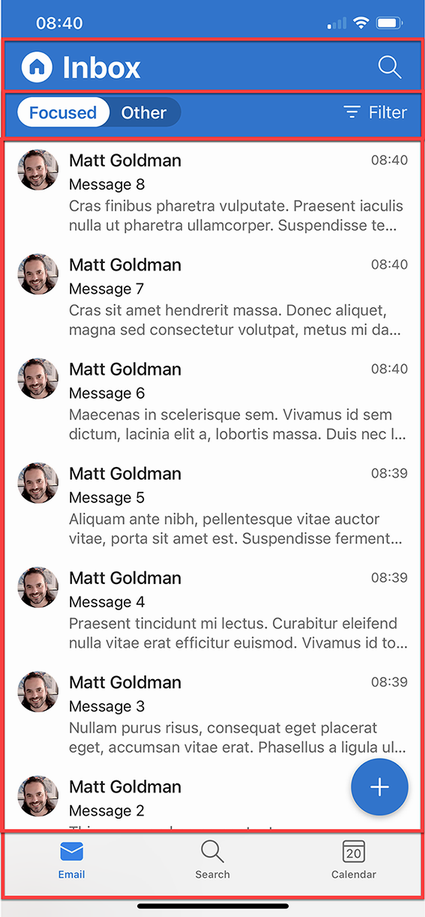
Inspect the four-row Outlook breakdown and its 50, 40, *, and 80 height approximation. section 6.4.2
Figure 6.24 The message template for the Inbox can be laid out as a Grid, with three columns and three rows. The avatar will reside in the first column and row and will have a row span of 3 (there’s nothing else in the first column). The sender’s name will go into the first row, second column. The subject will go into the second row, second column, and the message body preview will go into the third row, second column, and will span into the third column. The time or day when the message was sent will go into the first row, third column.
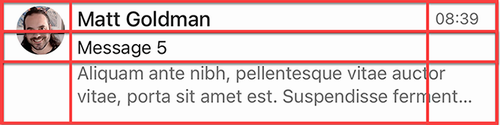
Inspect how a message template uses three rows and assigns an avatar across all three with RowSpan. section 6.4.8
