BLAS is a standard interface and collection of low-level routines for array and matrix operations, including vector addition and matrix multiplication. Numerical libraries such as NumPy depend on BLAS beneath higher-level algorithms. section 4.3.1
The implementation matters for performance. Netlib BLAS is generally nonthreaded and slow on modern systems, while OpenBLAS and Intel MKL provide threaded alternatives. Threading changes how CPU resources should be allocated: multiprocessing can overcommit cores when BLAS also uses multiple threads. section 4.3.1 section 4.3.2
Use the following workflow to identify and tune the BLAS implementation behind NumPy:
- Inspect NumPy’s reported configuration with np.show_config(). section 4.3.1
- If the output is unclear, inspect library files, package metadata, and symbolic links to determine the linked implementation. section 4.3.1
- Replace slow Netlib BLAS with OpenBLAS or MKL when performance requires it, then verify that NumPy links to the intended library. section 4.3.2
- Account for BLAS threading when choosing between threads, processes, and available CPU cores. section 4.3.1
Checking a linked implementation
Running np.show_config() may reveal BLAS and LAPACK library directories, but ambiguous package names can require inspecting files such as libcblas.so.3 to discover a link to libmkl_rt.so. section 4.3.1
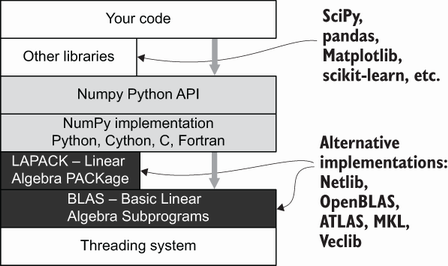
The NumPy stack diagram places BLAS and LAPACK beneath higher-level numerical functionality. section 4.3.1

