Blue-green deployment creates a new green subset of infrastructure, tests it separately, gradually shifts traffic from the existing blue environment, and then removes blue. It favors immutable resources, isolates change, and reduces the blast radius of risky infrastructure updates. section 9.2 section 9.2.6
Apply the pattern as an ordered infrastructure change:
- Copy the blue configuration into a green version, changing only the attributes required for the update. section 9.2.1
- Deploy the changed low-level resource, then recreate the high-level resources that depend on it. section 9.2.2
- Test the green infrastructure and its applications before exposing live requests. section 9.2
- Send a small percentage of traffic to green, verify requests and regression behavior, and increase the share over time. section 9.2 section 9.4
- Switch production traffic fully to green and remove the old blue resources after validation. section 9.2
Use blue-green deployment when reverting is slow or uncertain, dependencies are difficult to identify, or downtime would affect critical applications. It costs more temporarily because two environments exist, especially for low-level resources such as networks, projects, or accounts. section 9.2.6
Migrating a database
When a database cannot safely change networks in place, create a green database, migrate and reconcile data from blue, switch applications to the new endpoint, and remove blue. Stateful resources require this migration step because replacement can corrupt or lose data. section 9.3.1 section 9.4
Figure 9.5 Use blue-green deployment to create a green environment for the global network, send some traffic to the new resources, and remove the old resources.
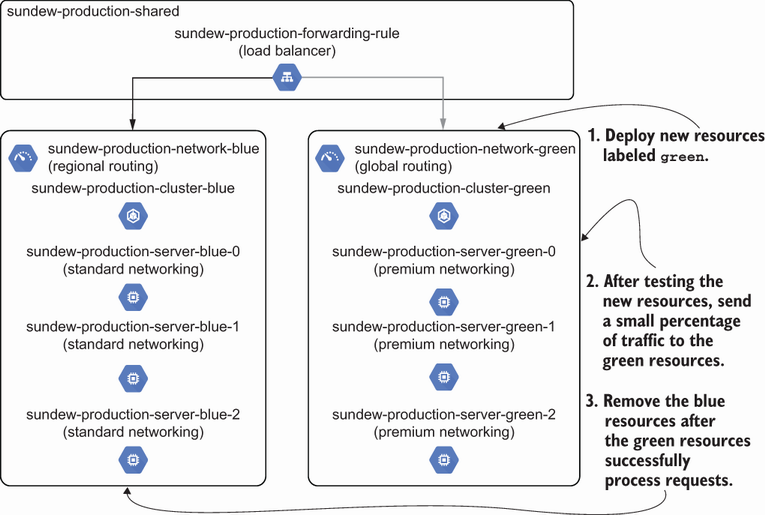
Trace the deployment flow from creating green global infrastructure through partial traffic, validation, full cutover, and removal of blue. section 9.2




