Body copy is the main running text of a page, excluding headings and other display text. It should prioritize comfortable reading over decorative personality. section 8.1.2 section 10.4
Use these decisions when designing body copy:
- Choose differentiated letterforms and avoid specialty, hairline, or very bold fonts for paragraphs, especially at small sizes. section 10.4
- Consider serif or sans serif typefaces according to the feeling the project should convey; both can be legible for body copy. section 8.1.2
- Start the type scale with body copy, typically 16–18px, and prefer relative units such as rem or em for responsive, user-adjustable sizing. section 8.2.4
- Tune line height and line length by inspecting readability rather than relying on a single perfect number. section 10.5
A practical body-copy setup
A web page can begin with 16px body copy and a 1.25 line-height, producing 20px lines. A 12px baseline and a 16px paragraph top margin preserve vertical rhythm because 20 plus 16 equals 36, a multiple of 12. Adjust the result after viewing the chosen typeface in the browser. section 10.5 section 8.2.4
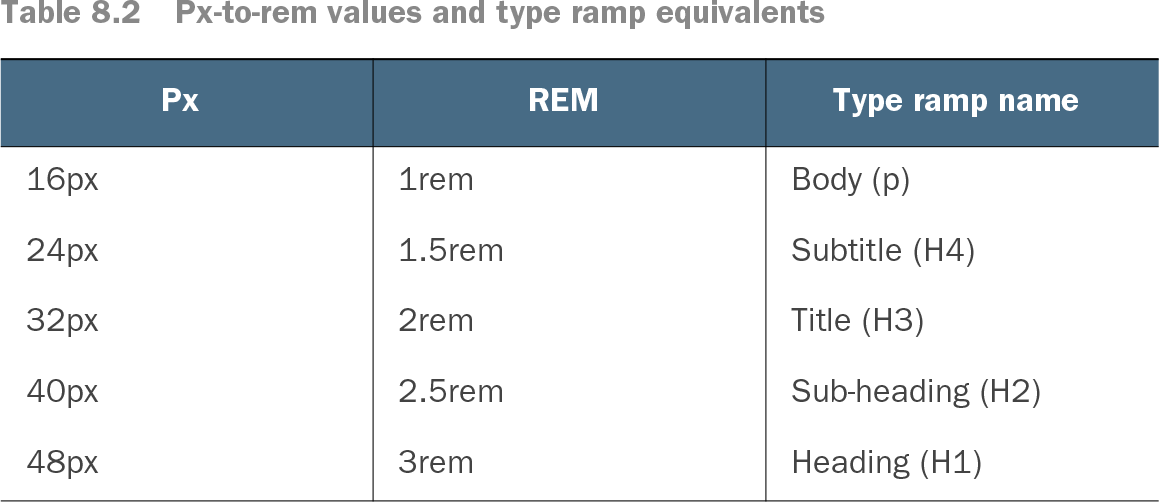
Table 8.2 Px-to-rem values and type ramp equivalents (view table figure)
Use the type-ramp table to see body copy positioned as the 16px base beneath subtitle, title, subheading, and heading sizes. section 8.2.4