liveBook · Manning

Branch

As explained in Building User-Friendly DSLs

A named sequence of version-control commits representing an independent line of work.

A branch is a named sequence of version-control commits representing an independent work package, such as a feature or bug fix. Teams commonly keep the mainline in main and develop changes on separate branches. section 10.1

A distributed version-control workflow uses branches to:

  • Branch from a mainline version. section 10.1
  • Record and share changes through a sequence of commits. section 10.1
  • Submit completed work for review before merging it into the mainline. section 10.1

Branch-based work supports concurrent and asynchronous collaboration, but merging becomes difficult when the mainline changes independently. Unresolved concurrent edits produce merge conflicts that developers must resolve manually. section 10.1

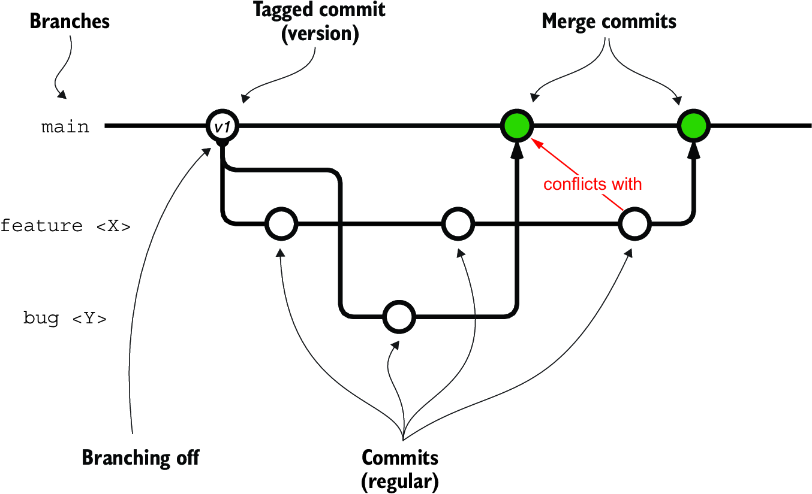
Figure 10.2 The main concepts of a DVCS, and a typical interaction
figure

Use the diagram to trace branches, commits, reviews, and merges through a typical distributed version-control interaction. section 10.1


How Building User-Friendly DSLs covers it

How deep it goes
Defines branches within distributed version control and explains branching, commits, review, merging, and merge conflicts.
Examples
Uses main, feature, and bug-fixing branches as naming examples, alongside commit sequences and merge-conflict scenarios.
What it assumes
Builds from commits and distributed version-control concepts, defining both alongside branches.
What you can do after
Operate Git-based distributed workflows by isolating changes, sharing commits, reviewing work, and merging branches.
How it connects
Connects branches to commits, distributed version control, mainlines, tags, merging, and merge conflicts.

Also explained in

Compare how 6 books explain branch →

Related concepts

This explainer was generated by Manning's knowledge graph from the text of Building User-Friendly DSLs. The section links point to the parts of the book it draws on.



