A middleware pipeline branch is an alternative request-processing path. In ASP.NET Core, a request matching a path prefix enters the branch; other requests continue along the main pipeline. section 31.1.2
Use Map when different URL areas need different middleware behavior. A request enters one branch or the trunk, never both. MapWhen provides a similar choice based on any HttpContext value, such as a header or query string. section 31.1.2
A /ping branch
app.Map("/ping", branch => { branch.UseExceptionHandler(); branch.Run(async context => { context.Response.ContentType = "text/plain"; await context.Response.WriteAsync("pong"); }); }); app.UseStaticFiles(); app.UseRouting(); app.MapRazorPages(); A request to /ping receives pong from the branch. Other requests continue to static files, routing, and Razor Pages. Run should terminate the branch because middleware placed after it will not execute. section 31.1.2 section 31.4
Figure 31.1 A sequential middleware pipeline compared with a branching pipeline created with the Map extension. In branching middleware, requests pass through only one of the branches at most. Middleware on the other branch never see the request and aren’t executed.
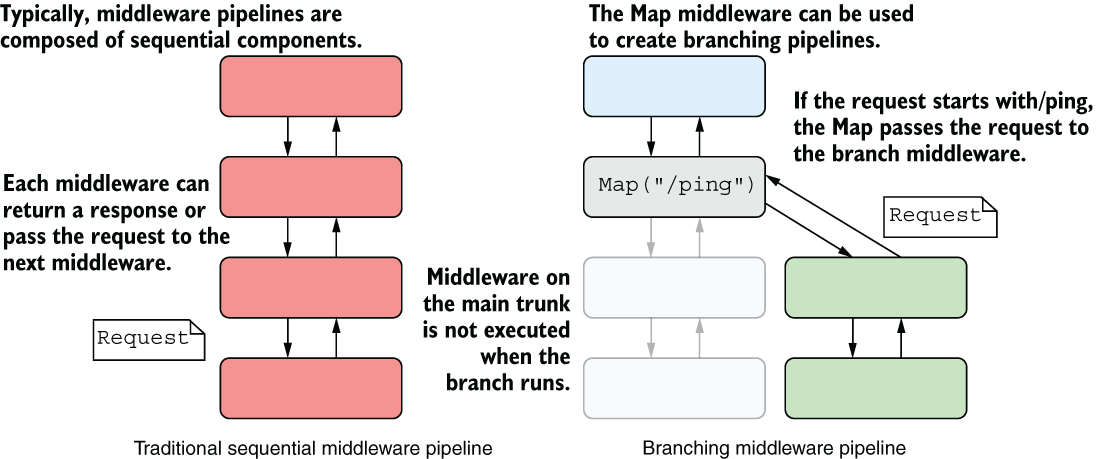
Compare a sequential pipeline with a branching pipeline: matched requests enter only the selected branch, while middleware on the other branch never executes. section 31.1.2
Map performs a simple string-prefix match rather than full routing and does not support route parameters. When it matches, it moves the matched path segment from HttpContext.Path to PathBase so routing inside the branch works correctly. section 31.1.2 section 31.4





