A breadcrumb, or honeytoken, is a deliberately planted clue that looks useful to an adversary but is fake. It can be a browser cookie, document, process trace, or credential artifact. Using it creates conspicuous logging, giving defenders high-fidelity evidence of adversary activity. section 10.1 section 10.2.3
Breadcrumbs support active defense when ordinary telemetry is unavailable or an adversary avoids leaving traces. Place them where they appear plausible, monitor every interaction, and update them as attack techniques change. Realism matters: an implausible decoy can expose the trap rather than lure an adversary. section 10.1 section 10.2.3 section 10.6
Use breadcrumbs as a controlled hunting workflow:
- Choose believable traces that fit the environment, rather than deploying conspicuous or excessive traps. section 10.1 section 10.6
- Plant the traces across relevant internal hosts and configure alerts for their use. section 10.2.3
- Investigate an alert as evidence of a possible foothold, then scope affected hosts and hand off or continue incident response. section 10.2.6
- Maintain or retire breadcrumbs according to the hunting effort and investigation status. section 10.6 section 10.2.6
Credential trace for lateral movement
A planted password hash for a fake account can be left on Windows clients and servers. An adversary who dumps LSASS credentials may recover and try the account elsewhere, producing authentication events that identify the involved systems and guide follow-up process analysis. section 10.2.3 section 10.2.6
Figure 10.1 How an adversary might capture breadcrumbs and play them against other hosts
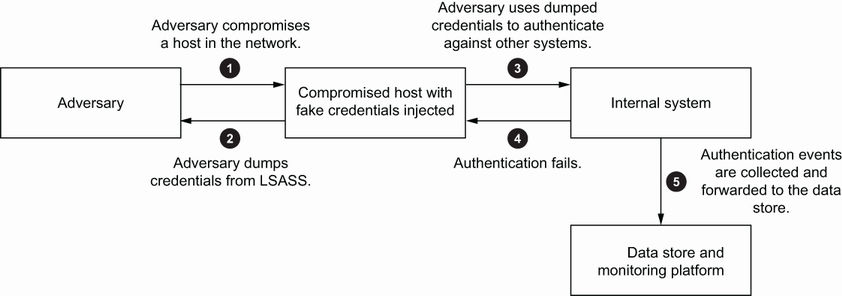
Follow the adversary path from discovering a breadcrumb to attempting its use against another host. section 10.2.3
