A breakpoint pauses script execution at a chosen line so you can inspect variables and properties, step through code, or resume normally. It is a core tool for finding logic bugs. section 23.4.1 section 23.6
Use a breakpoint in VS Code to inspect a script as it runs:
- Set a breakpoint beside the line where a variable has just been assigned or is about to be used; press F9 to toggle it. section 23.4.1
- Press F5 to run the script until execution reaches the breakpoint, then examine the highlighted line and Debug pane. section 23.4.1
- Inspect values in the terminal, use F11 to advance one line, or resume execution with F5. section 23.4.1
Inspecting a disk object
Pause on line 17 after $disk is assigned, then inspect $disk and its DriveType property. Comparing the observed value with the expected string can expose a logic error. section 23.4.1 section 23.4.3
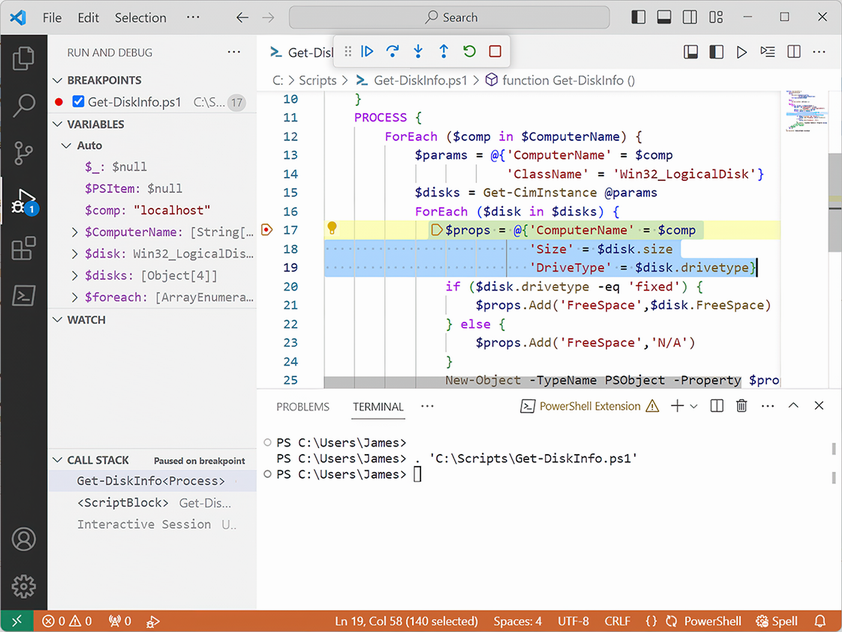
Use the debugger view to recognize the paused line, open the Debug pane, and confirm that execution has reached the breakpoint. section 23.4.1





