A breakpoint marks a line where a debugger pauses program execution. Once paused, you can continue manually, execute instructions one at a time, inspect variable changes, and evaluate expressions. section 1.2.1 section 2.4
Use a breakpoint when the observable result is wrong and you have identified code whose behavior is unclear. Place it at the first instruction that hides logic, rather than automatically at the beginning of a code block. section 2.2 section 1.2.1
A focused breakpoint investigation follows these steps:
- Read the code and identify the first unclear instruction. section 2.2
- Mark that line in the IDE gutter and run the application with the debugger. section 2.2
- Inspect variables in scope and the execution stack trace when execution pauses. section 2.2
- Prefer stepping over; step into only when necessary, then step out when the nested logic becomes clear. section 2.4
Investigating a decoder
In a decoder that extracts digits from each input string, place the first breakpoint on the unclear extraction instruction: var digits = new StringDigitExtractor(s).extractDigits(); When execution pauses, inspect digits and the stack trace before deciding whether to step into the extraction logic. If pausing would disrupt a lengthy or multithreaded process, configure a non-blocking conditional breakpoint to log values and call paths instead. section 2.2 section 3.2
Figure 1.4 Using a debugger, you can pause the execution before a particular instruction and then observe how the app’s logic changes the data by manually running the instructions step by step.
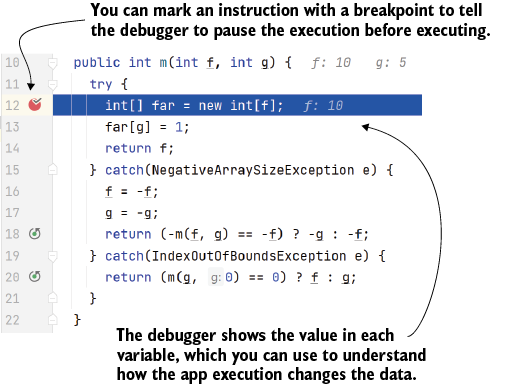
The execution diagram shows how a breakpoint pauses before an instruction and supports step-by-step observation of data changes. section 1.2.1
Figure 3.8 Conditional breakpoint advanced configuration. In addition to specifying a condition for the breakpoint, you can instruct the debugger to not suspend the execution for the given breakpoint. Instead, you can simply log the data you need to understand your case.
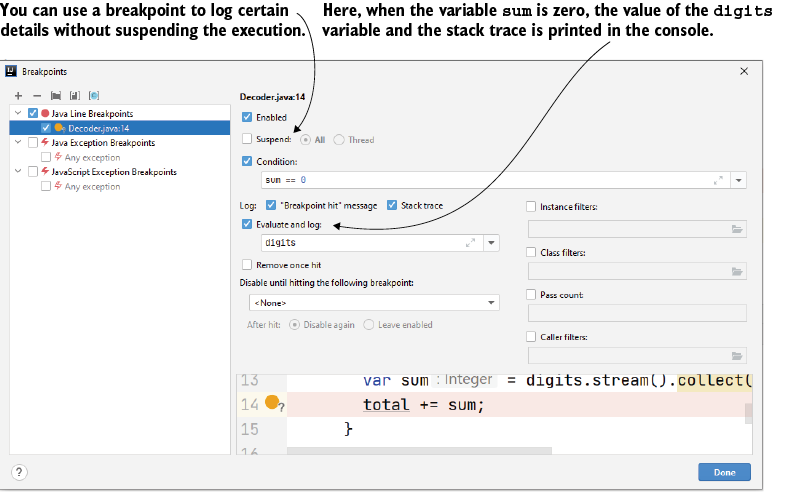
The configuration figure shows how a conditional breakpoint can log selected information without suspending execution. section 3.2





