An SVG viewport is the visible rectangular frame through which a graphic is seen. The width and height attributes set the frame’s size, but they do not change the graphic inside it. If the graphic is larger than the frame, it overflows. The viewport’s origin is its top-left corner. section 3.2.2
A responsive loader can use width="100%" so its SVG fills the available width of its parent. If the loader sits inside a section capped at 800 pixels, it grows with that section until the cap is reached. The viewport controls the available frame; the viewBox controls how the graphic fits inside it. section 3.2.2
Use the viewport and viewBox for different jobs:
- Set width and height to define the visible SVG frame. section 3.2.2
- Set viewBox="min-x min-y width height" to position and scale the graphic within that frame. section 3.2.3
- Match viewport and viewBox dimensions when the graphic should fit without zooming. section 3.2.3
Responsive scanning loader
Start with <svg width="100%" height="300px"></svg> inside a section. The SVG occupies the section’s available width while keeping a 300-pixel-high frame. Adding viewBox="0 0 710 300" gives the loader’s bars a 710-by-300 coordinate space, allowing the graphic to scale with its container. section 3.2.2 section 3.2.3
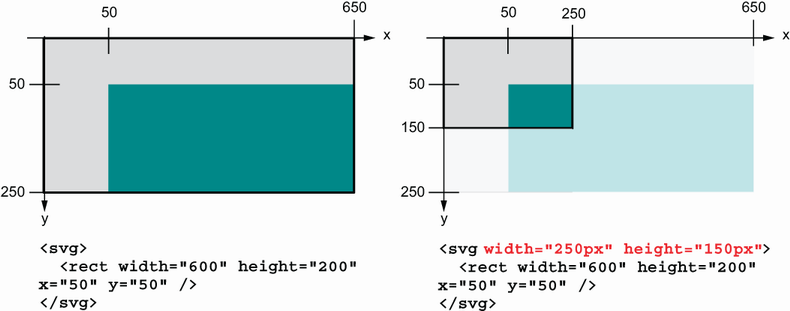
Compare SVGs with and without a defined viewport to see how the visible frame changes. section 3.2.2


