Buffering temporarily holds events between pipeline stages so inputs and outputs can run at different speeds. It absorbs source spikes and slower destinations, reducing the risk that the pipeline becomes a throughput bottleneck or loses data. section 1.2.2
Figure 1.2 Logical Fluent Bit architecture, with the blocks representing logical features and the lines representing the possible flow of events. The standard Fluent Bit groupings are overlaid, but I’ve separated and illustrated the buffers slightly differently, as their positions are more logical than how they fit into the code base.
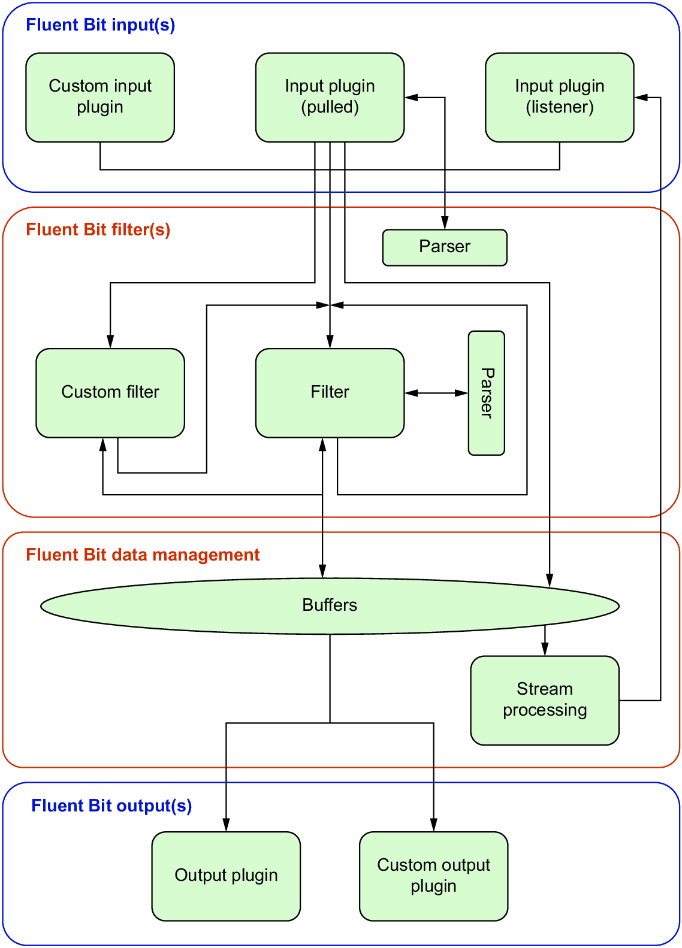
Buffers sit around event-processing stages: inputs receive events, filters fetch and return them, and outputs consume them. Their placement lets the pipeline decouple collection, transformation, and delivery rates. section 1.2.2
Configure buffering around the trade-offs that matter:
- Buffer after filtering when possible. Grouping events reduces per-transfer overhead, and filtering first avoids storing events that will be discarded. section 1.3.5
- Use chunks as the working units of an input buffer. A chunk holds complete events, and multiple chunks let one be processed while another is filled. section 3.7
- Size each chunk above the largest event. Larger chunks favor efficiency; smaller chunks favor throughput. More retained events also increase potential loss after an ungraceful termination. section 3.7
- Flush can move a partially filled chunk on a time basis, rather than waiting for it to reach capacity. section 3.7
- Choose memory for normal speed or filesystem storage when restart-readable buffered data is needed. Filesystem buffering incurs slower file I/O and added performance cost. section 1.2.2 section 3.7
Buffer capacity is shared across chunks: the available chunk count follows total buffer storage divided by chunk size. Treat capacity as an operational limit, not merely a performance setting; event surges can require substantially more memory than normal traffic. section 3.7 section 8.4.3
Buffering for a slow or uncertain destination
When an output destination’s concurrency capacity is unknown, use buffering first to protect sources from bottlenecks. Adding workers can help with blocked I/O, but too many workers can overload the destination, time out connections, or add context-switching overhead in virtualized environments. section 5.2.4
Stream-processing windows also retain data in buffers. Size buffering for the window duration and peak event volume: too little can produce empty windows, while too much can exhaust memory. Keep window and flush behavior distinct, because data may flush while remaining retained for a longer window. section 8.4.3 section 8.4.1




