The <ul> element creates an unordered, or bulleted, list. Use it when related items belong together but have no inherent numeric order. The browser adds the bullets automatically, so there is no need to type them yourself. section 3.9
Build a bulleted list in two layers:
- Wrap the collection in opening and closing <ul> tags. section 3.9
- Put each item inside an <li> element, with an optional but recommended closing </li> tag. section 3.9
- Let the browser display each item with a bullet and indentation. section 3.9
A simple grocery list
<ul> <li>Apples</li> <li>Rice</li> <li>Tea</li> </ul> The browser displays three indented items with bullets. Use examples such as to-do lists, grocery lists, object traits, or course prerequisites. section 3.9
<li>Item text</li>
Inspect the compact <li> item pattern before nesting several items inside a <ul> container. section 3.9
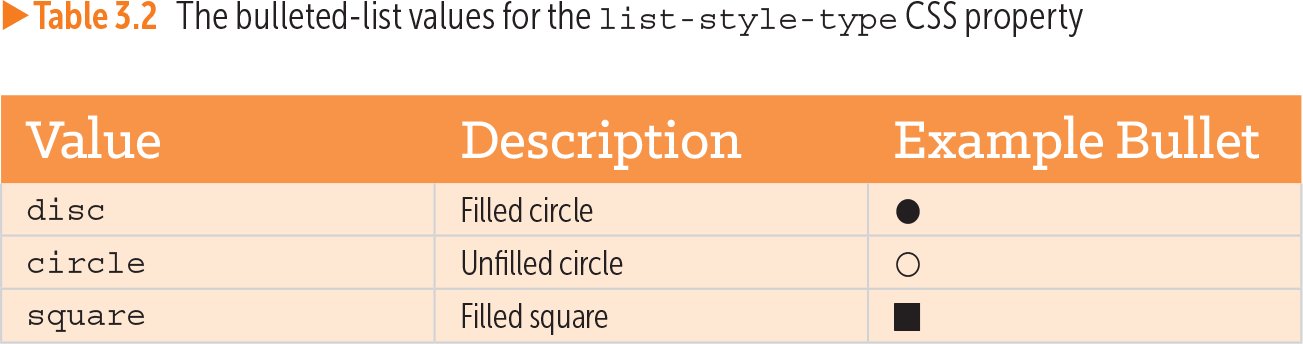
Table 3.2 The bulleted-list values for the list-style-type CSS property (view table figure)
| Value |
Description |
Example Bullet |
|---|---|---|
| disc |
Filled circle |
⚫ |
| circle |
Unfilled circle |
⚪ |
| square |
Filled square |
◼ |
Compare CSS list-style-type values for filled-circle, unfilled-circle, and filled-square bullets. section 3.9