Module bundling combines source modules and their dependencies into one or more deployable files. It preserves the benefits of small, organized JavaScript files while reducing browser network requests and avoiding timing problems caused by scripts loading separately. section 12.4
A module bundler typically:
- Follows import statements to discover the dependency graph. section 12.4
- Combines the required modules into a final output file or multiple output bundles. section 12.4
- Uses tree shaking to omit imported modules that the application never uses. section 12.4
- Generates source maps so bundled errors can be traced back to source files. section 12.4
Building a component with Rollup
Keep a component’s source in separate files, such as slider.js and its imported modules, then run Rollup with the source entry point, an output filename, the UMD format, a global name, and source-map generation. A package.json build script can wrap that command, while separate scripts can build several components and a combined script can run them in sequence. section 12.4 section 12.4
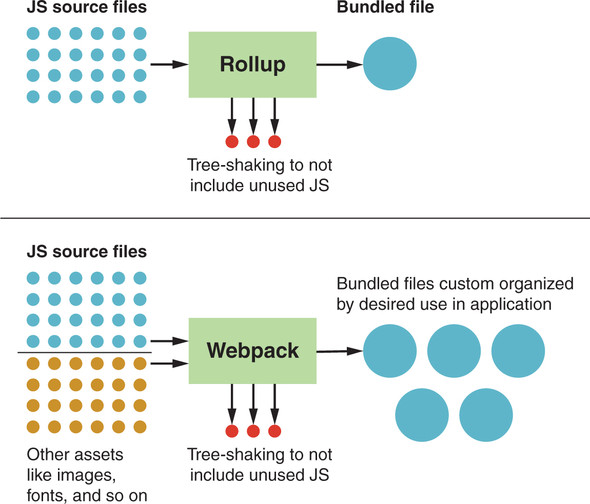
Compare Rollup and Webpack when choosing between focused module bundling and broader multi-bundle or file-type support. section 12.4







