CSS Modules keep ordinary CSS files but change how components use their class names. During bundling, each class is assigned a generated name, and importing the file gives JavaScript an object that maps the original names to those generated names. This lets components use short names such as `.wrapper` without requiring those names to be unique across the application. section 7.4 section 7.4.1
Figure 7.4 The relationship between the component and the CSS Module. We can use whatever class names we want in the module, and we refer to those class names in the component as direct variables. The resulting output will replace these class names in both the CSS file and the module with some autogenerated class names, partially based on the CSS Module filename, the class name, and some randomly generated padding to prevent collisions.
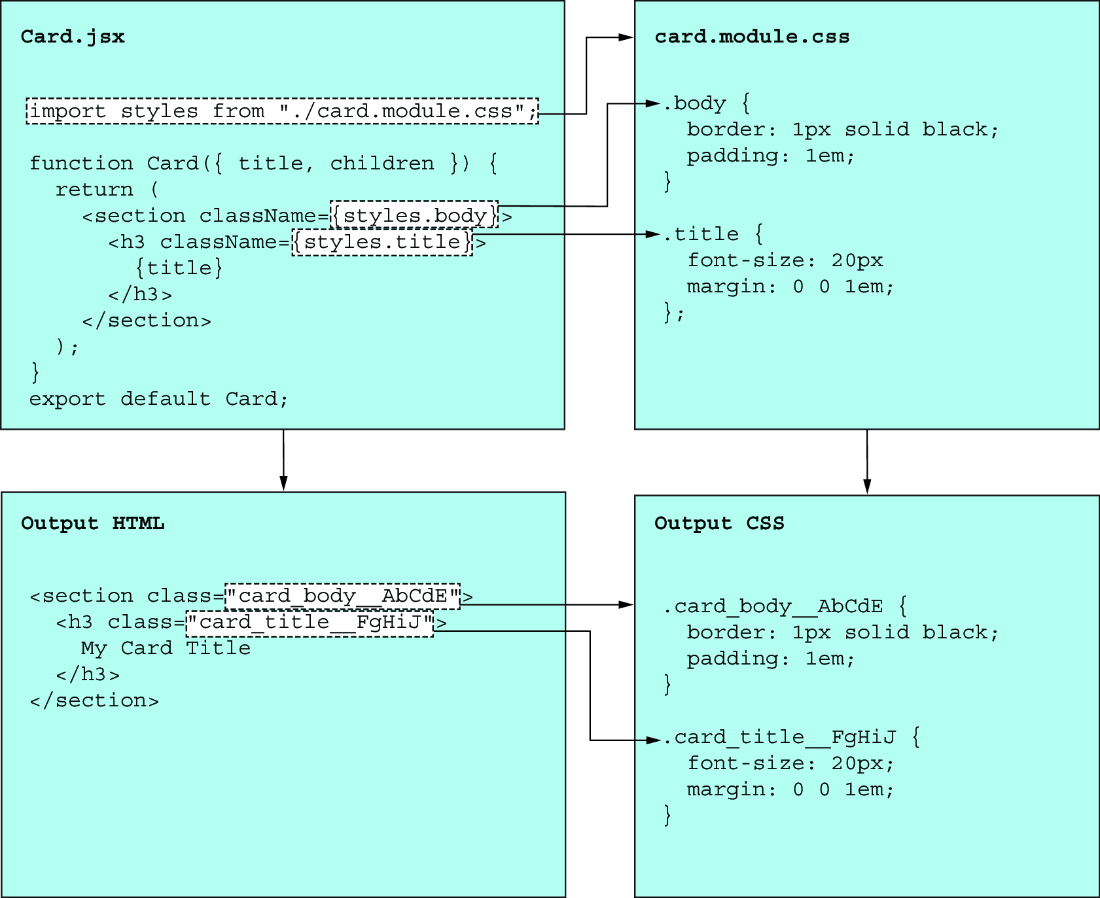
The diagram traces a class name from a CSS Module through its JavaScript import to the generated name used in the output. section 7.4.1
In a Vite project, name the file `button.module.css` rather than `button.css`, then import it into the component. Vite supports this by default. Other bundlers need suitable processing: webpack can use `css-loader`, while PostCSS can use `postcss-modules`. section 7.4.1 section 7.4.2
Style a button without shared class names
In `button.module.css`, define `.normal`, `.outline`, and `.icon`. In `Button.jsx`, use `import styles from "./button.module.css"`, then assemble `className` from `styles.normal` and, when appropriate, `styles.outline`. Give the SVG `className={styles.icon}`. A parent can import `app.module.css` and pass `className={styles.customButton}` to override the button. Keep a dynamic width in the button’s inline `style`: CSS Modules do not remove that need. section 7.4.3 section 7.4.5
The generated names solve collisions, not every CSS problem:
- Class references in components use imported properties rather than matching handwritten strings. A class such as `.wrapper` can be reused in another module, and an unused rule is often easier to identify within the components that import its file. section 7.4.4
- Specificity and source order still matter. If a parent’s custom button rule loads before the button’s base rule, a selector such as `button.customButton` can give the override enough specificity. section 7.4.3
- Styles and components remain in separate files. Generated names can complicate browser debugging, and a selector cannot directly rely on a class name defined in another module remaining unchanged. section 7.4.5
CSS Modules are a workable choice for larger React applications, particularly when a team wants familiar CSS files with fewer naming collisions. There is no need to replace a working setup merely for novelty. For a new project, weigh the two-file workflow, dynamic-style needs, and debugging costs against alternatives such as plain CSS files and styled-components; no styling method fits every team. section 7.4.6 section 7.6
