styled-components is a CSS-in-JS library for defining styled React elements in JavaScript files beside the components that use them. Instead of maintaining a CSS file and applying class names in JSX, define an element with CSS already attached and render it directly. This keeps small components’ structure, behavior, and styles together, though larger component files can become lengthy. section 7.5 section 7.5.3
Figure 7.5 The structure on the left is what CSS Modules give us. But what if we could skip some of that extra work and go to the version on the right, where we don't have to type the class names and can import the CSS directly as components?
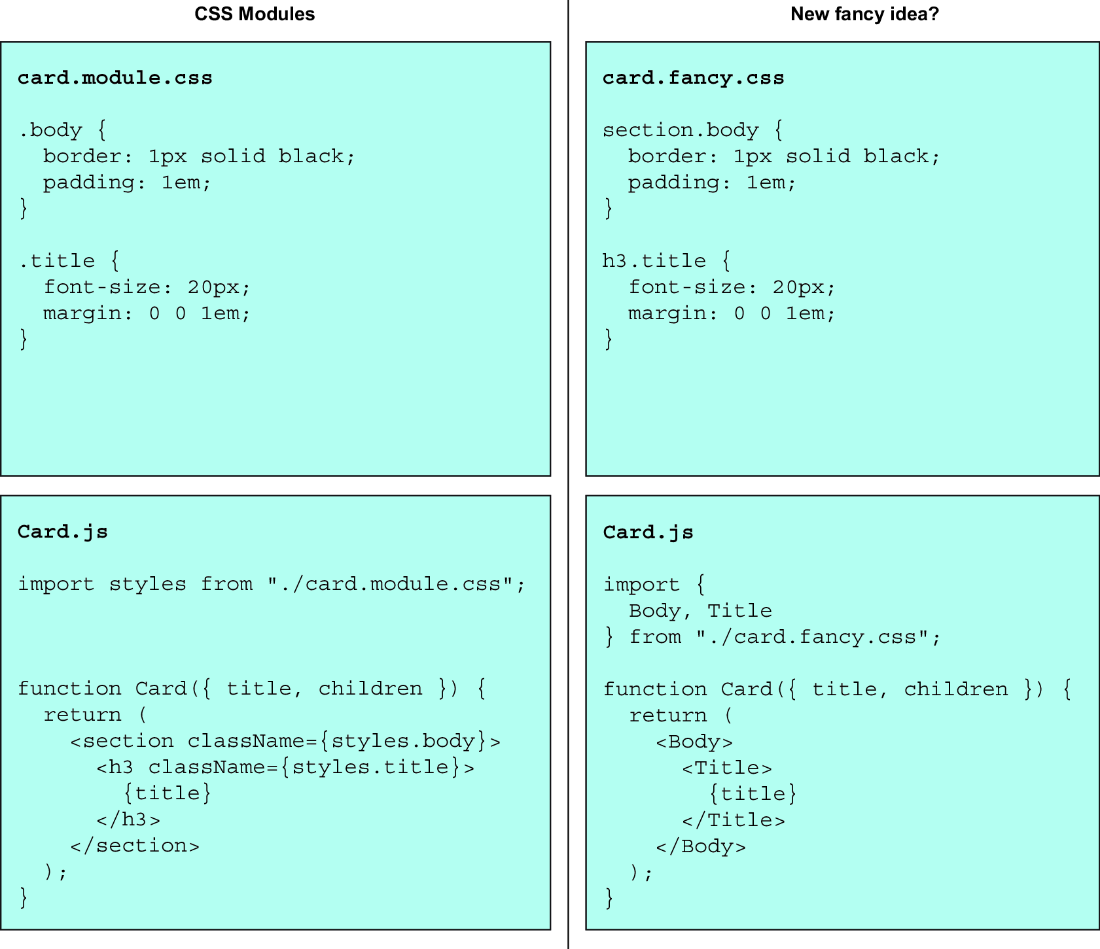
Compare the CSS Modules path—CSS file, local class name, and JSX element—with the styled-component path, which removes the class-name step from JSX. section 7.5
A styled definition can do more than attach a fixed rule:
- Create an element with a tagged template literal, such as `styled.button` followed by backtick-delimited CSS. Interpolate JavaScript values or functions to derive rules from props. section 7.5.1
- Use nested selectors for states such as `:hover` or `:disabled`, and interpolate another styled component to target it within a rule. section 7.5.1
- Extend an existing definition with `styled(ExistingComponent)` to add or override rules. When wrapping a custom React component, pass its received `className` to the relevant JSX element so the generated styling applies. section 7.5.1 section 7.5.3
A prop-driven button
`const Submit = styled.button`background-color: ${({ color }) => color};`;` defines CSS from a prop; `<Submit color="red">Red submit!</Submit>` uses it. In a fuller button, styled definitions can sit beside JSX for normal, outline, disabled, wide, and extended custom variants. Install the package with `npm install --save styled-components` before importing `styled`. section 7.5.1 section 7.5.3 section 7.5.2
Colocation, short selectors, composition, and collision-free class naming make this a strong option for complex designs with many one-off components. It is not an automatic choice: unified dashboards and component libraries may suit another approach, and keeping CSS in JavaScript can reduce the overview benefit as components grow. Compare it with CSS files, CSS Modules, or other styling approaches against the needs of the project and team. section 7.5.4 section 7.5.6 section 7.7
