CacheTagHelper is an ASP.NET Core tag helper for caching rendered view or page fragments. Place the fragment inside a cache element to reuse its generated content across requests. section 26.6 section 26.8
Configure a cache element with attributes that control storage, expiry, and request-specific versions:
- Use enabled to turn caching on or off; omitting it enables caching. section 26.6
- Set expires-on for an absolute DateTime, expires-after for a relative TimeSpan, or expires-sliding for inactivity-based expiry. section 26.6 section 26.6.1
- Use vary-by attributes, such as vary-by-route, to maintain separate cached versions for different requests. section 26.6.1
- Use distributed-cache instead of cache when shared storage across application servers and survival across restarts are required. section 26.6
Cache a timestamped layout fragment
A layout can leave one timestamp uncached while wrapping another in <cache expires-sliding="@TimeSpan.FromSeconds(10)">. Reloads within ten seconds reuse the cached timestamp; later reloads generate it again. section 26.6.1 section 26.6
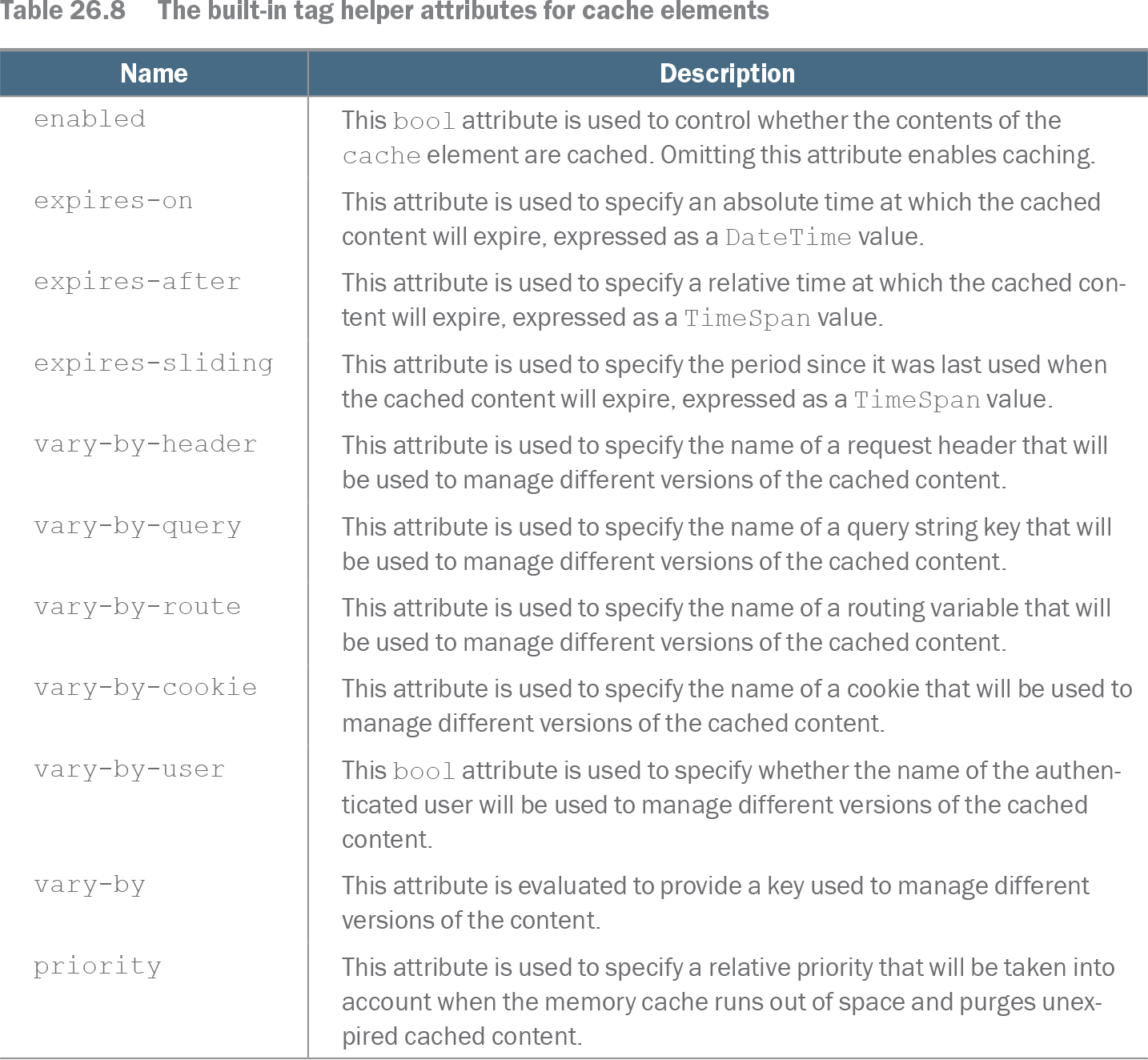
Table 26.8 The built-in tag helper attributes for cache elements (view table figure)
| Name |
Description |
|---|---|
| enabled |
This bool attribute is used to control whether the contents of the cache element are cached. Omitting this attribute enables caching. |
| expires-on |
This attribute is used to specify an absolute time at which the cached content will expire, expressed as a DateTime value. |
| expires-after |
This attribute is used to specify a relative time at which the cached content will expire, expressed as a TimeSpan value. |
| expires-sliding |
This attribute is used to specify the period since it was last used when the cached content will expire, expressed as a TimeSpan value. |
| vary-by-header |
This attribute is used to specify the name of a request header that will be used to manage different versions of the cached content. |
| vary-by-query |
This attribute is used to specify the name of a query string key that will be used to manage different versions of the cached content. |
| vary-by-route |
This attribute is used to specify the name of a routing variable that will be used to manage different versions of the cached content. |
| vary-by-cookie |
This attribute is used to specify the name of a cookie that will be used to manage different versions of the cached content. |
| vary-by-user |
This bool attribute is used to specify whether the name of the authenticated user will be used to manage different versions of the cached content. |
| vary-by |
This attribute is evaluated to provide a key used to manage different versions of the content. |
| priority |
This attribute is used to specify a relative priority that will be taken into account when the memory cache runs out of space and purges unexpired cached content. |
Use the attribute table to compare cache enablement, expiry policies, and request-variation settings. section 26.6