A coordinate system is a reference framework for locating points. In SVG, the drawing area is a two-dimensional plane with perpendicular x and y axes. The origin is the SVG container’s top-left corner: x increases to the right, while y increases downward. SVG shape attributes use these values to place visible elements. section 1.2.2
Figure 1.11 Coordinate system of the SVG container and position of an element
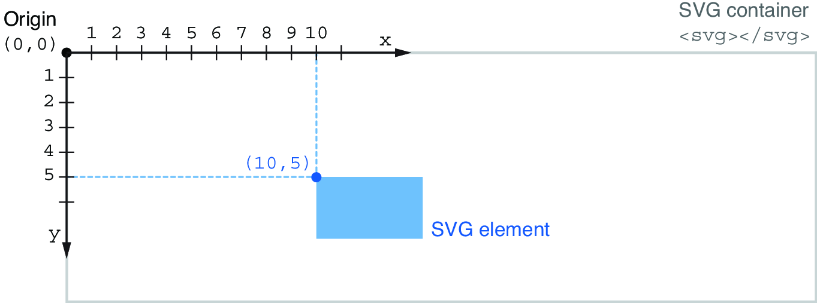
Use the diagram to connect the top-left origin to an element’s horizontal x position and downward y position. section 1.2.2
Use coordinates through each shape’s placement attributes:
- Set a line’s endpoints with x1, y1, x2, and y2. section 1.2.2
- Place a rectangle by its x and y position, then set width and height separately. section 1.2.2
- Place a circle or ellipse from its center with cx and cy; use radius values to size it. section 1.2.2
- Position text with x and y, then use text-anchor when its alignment should follow the middle or end rather than the start. section 1.2.2
Reserve chart margins with a translated group
A chart needs room for labels, legends, and axes. Rather than adding the left and top margin to every mark’s coordinates, create a group for the inner chart and translate it once. The group establishes a new coordinate system, so coordinates inside it begin at the chart’s reserved drawing area. const innerChart = svg .append("g") .attr("transform", `translate(${margin.left}, ${margin.top})`); section 4.1.1
This grouped approach separates the full SVG container from the plot area. After the translation is in place, axes and chart marks can use coordinates relative to the inner chart while margins remain available for supporting information. section 4.1.1



