A vector is just a group of numbers until a coordinate system tells you what those numbers mean. In graphics, screen space describes pixels relative to the window’s top-left corner; it is useful for drawing interface elements and processing mouse input. section 7.4.2
A vertex shader translates geometry into normalized device coordinates, where the screen center is (0, 0, 0) and x and y values of −1 and +1 mark the screen edges. More precisely, shader output is in clip space as (x, y, z, w); dividing x, y, and z by w produces normalized device coordinates. Setting w to 1.0 avoids changing those coordinates through that division. Geometry outside clip space is not visible. section 7.4.2
A triangle as a graphics starting point
Drawing a triangle is a compact way to get started with graphics programming. Its vertices only become meaningful when interpreted in a coordinate system. section 7.4.2
Figure 7.5 Screen space vs. normalized device coordinates
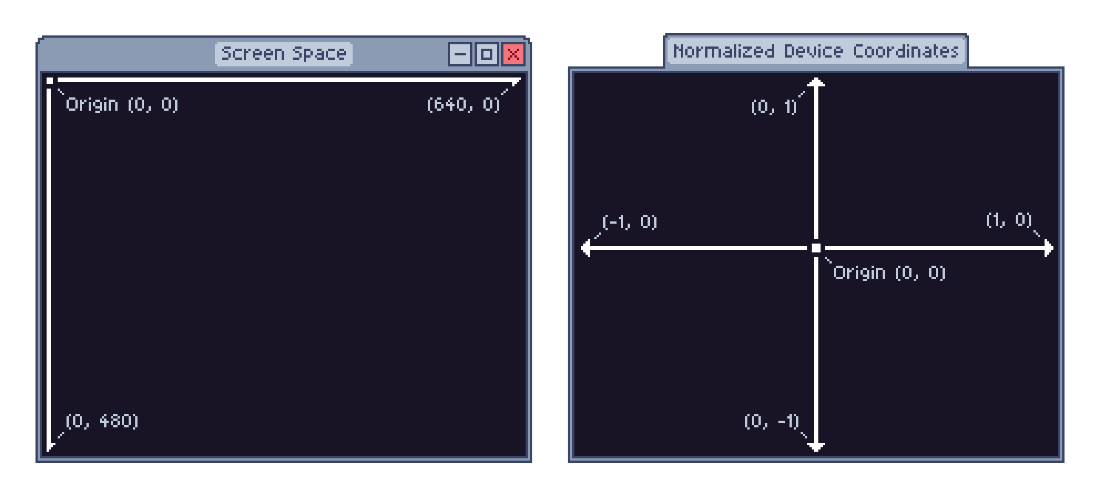
Compare screen space with normalized device coordinates to see how the coordinate frame changes. section 7.4.2