A categorical palette assigns a different, distinguishable color to each separate category. Unlike sequential or diverging palettes, it does not imply that one category is more or less than another; its job is simply to keep groups apart. section 4.3 section 4.3.2
This sounds easy until a chart has many categories. A separate color for everything quickly becomes “rainbow spaghetti”: viewers cannot reliably tell groups apart, even when every category technically has its own hue. More colors are not automatically more clarity. section 4.3.2
A useful categorical palette balances several demands:
- Make colors distinct enough to discern quickly, including for people with color-vision deficiencies. section 4.3.2
- Make the set look coherent while matching an appropriate tone and avoiding culturally fraught associations. section 4.3.2
- Prefer colors that can be named distinctly when people need to discuss what a chart shows. section 4.3.2
- Avoid treating a large category count as a request for an equally large collection of colors. section 4.3.2
Color-wheel schemes offer one starting point for finding related colors. Another is to extract a palette from a photograph or artwork, especially nature, then adjust it when the generated colors are too similar. Starting from one or two brand colors and generating companions can also help, though large or colorblind-friendly palettes may remain difficult. section 4.3.3
From sunset to usable categories
A sunset photograph can produce an initial palette, but the first result may not separate categories clearly enough. Adjusting saturation and lightness while keeping hues unchanged can turn that starting set into a more suitable palette. section 4.3.3
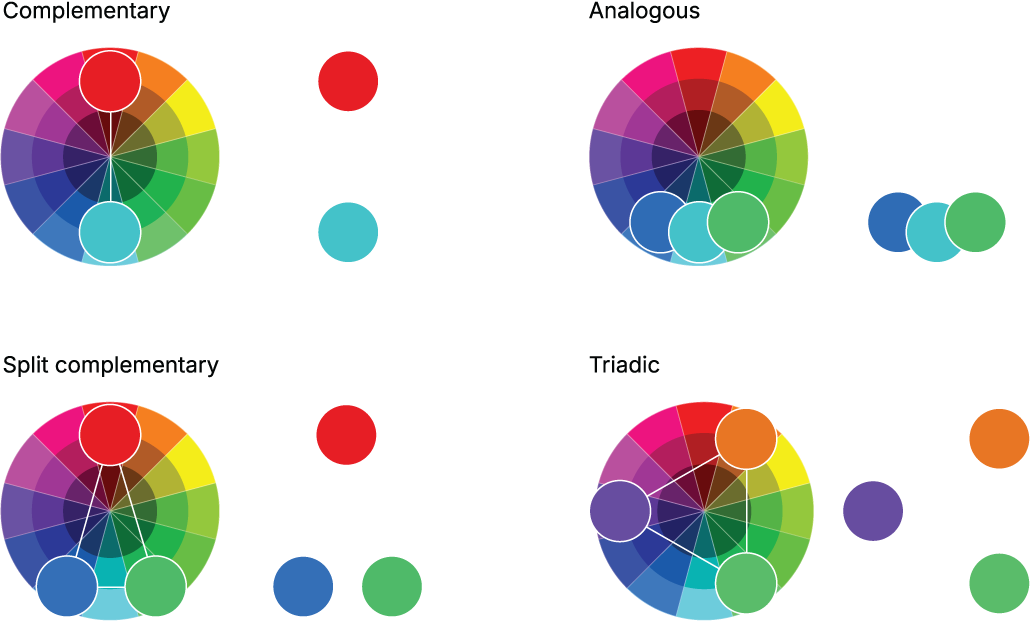
Compare common color-wheel schemes as possible starting structures for a categorical palette. section 4.3.3

