A CDI bean is a Java object managed by the CDI container according to contextual dependency-injection rules. In Quarkus, application beans appear alongside built-in beans created by the framework. REST endpoints are CDI beans even when their classes have no CDI annotation; a REST endpoint uses @Singleton as its default scope. section 3.3.1
Use Quarkus Dev UI and ArC to inspect how beans participate in an application:
- Open the ArC extension and select Beans to list application and built-in CDI beans. section 3.3.1
- Inspect each bean’s scope and type; a class-based bean such as org.acme.GreetingResource is shown with its CDI scope. section 3.3.1
- Follow the Bean Dependency Graph to visualize dependencies, or open an application bean directly in the detected IDE. section 3.3.1
- During testing, replace CDI beans that are unsuitable for direct execution with mocks, including remote-service dependencies. section 5.0
Figure 3.4 List of the application’s CDI beans in the Dev UI, including beans added through the application code and auxiliary beans generated by Quarkus
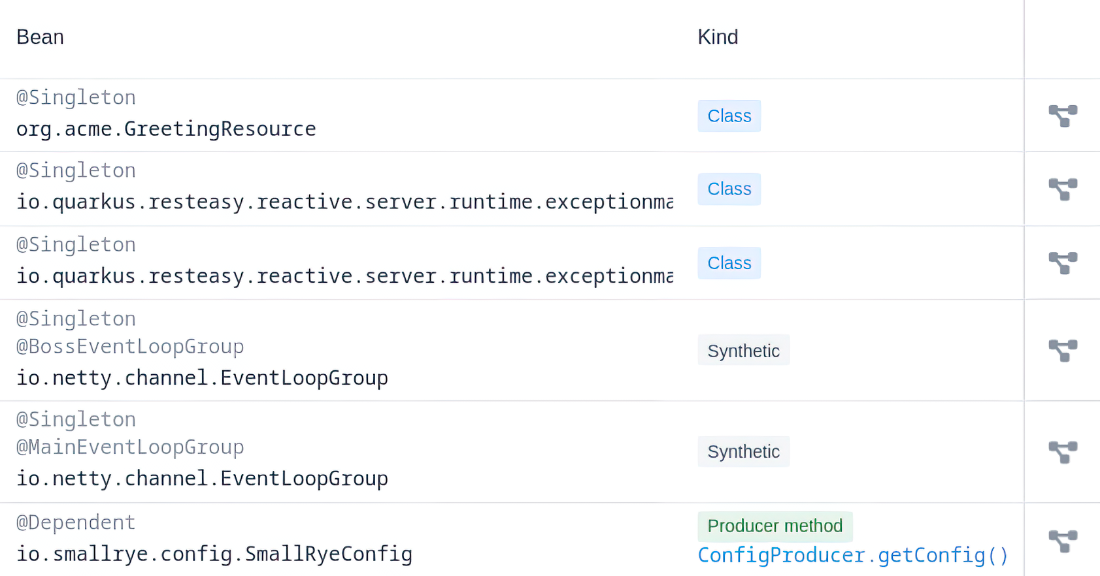
Use the Dev UI bean table to distinguish application beans from Quarkus-generated auxiliary beans and inspect their scopes and types. section 3.3.1
Figure 3.5 The Bean Dependency Graph of the GreetingResource class
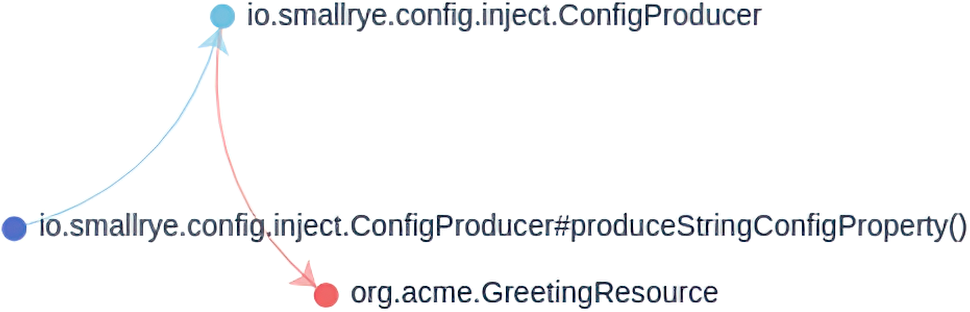
Use the dependency graph to trace the relationships around the GreetingResource bean. section 3.3.1
