Claude Code is an agentic coding tool that runs in a terminal inside a repository. A natural-language prompt can start a sequence of local actions, such as searching files, editing code, running a build, and executing tests. The model runs in Anthropic’s cloud; the tools run on your machine. section 5.1
You set the goal, make decisions, and review the results. A long, autonomous run can be useful for clearly specified work that is easy to acceptance-test, but it can also leave a large review task. For less certain work, direct Claude in smaller steps and share decisions as it goes. section 1.6 section 5.0
Start a development session:
- Install Claude Code on macOS, Windows, or Linux, then run `claude auth login` and complete the browser sign-in. section 5.2
- Open your Git repository in an editor with a terminal and, preferably, Git integration. Run `claude --permission-mode manual` to begin with explicit permission checks. section 5.2 section 5.3
- Describe a bounded task, then review the changed files and test results. Use the editor’s differences view to inspect what Claude created or edited. section 5.0 section 5.2
Investigate a deployment
While examining a Kubernetes deployment YAML file, ask Claude about the problem. It may request permission to run a `kubectl` command and compare the live deployment with the file. Check the proposed command and its output before accepting the diagnosis. section 5.1
Permissions control how much work can proceed without approval. Manual mode checks actions; `acceptEdits` pre-approves edits and commands judged safe within the working directory; `plan` permits reading and navigation without edits; and `auto` uses an AI classifier as approver. Be explicit about the mode because defaults can change. section 5.6
There is no physical sandbox restricting access to tools and files you permit. `bypassPermissions` skips permission checks and can expose the machine to dangerous commands, including commands induced by malicious repository instructions. Reserve it, if at all, for explicitly risk-accepted work in an isolated environment. section 5.1 section 5.6
Figure 5.1 Claude Code runs inside your repository with no sandbox. The permissions model asks your consent to access files and run tools, but there is no physical backstop to prevent unwanted behavior.
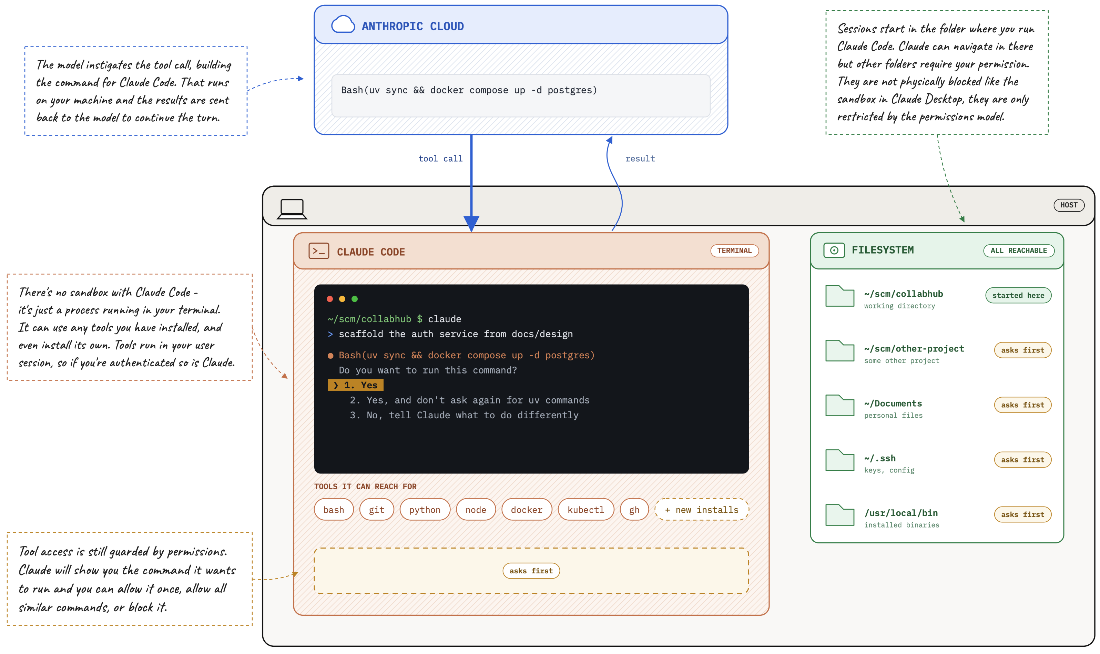
See how repository access, local tools, and permission checks fit together. section 5.1

