liveBook · Manning

Client band select

As explained in Acing the CCNA Exam: Volume 2 Advanced Networking and Security

Client band select is a wireless controller feature that encourages clients capable of both bands to use the 5 GHz band.

Client band select is a WLAN controller feature that encourages dual-band clients to use 5 GHz instead of 2.4 GHz, which is usually more crowded. section 21.3.3

The feature operates as follows:

  • An LWAP delays responses to client probes on the 2.4 GHz band. section 21.3.3
  • A client capable of using both bands is thereby encouraged to select 5 GHz. section 21.4
  • Enable the feature for a WLAN from the WLC Advanced tab, then apply the configuration. section 21.3.3
Figure 21.20 The Advanced tab allows you to enable features like Client Load Balancing and Client Band Select.
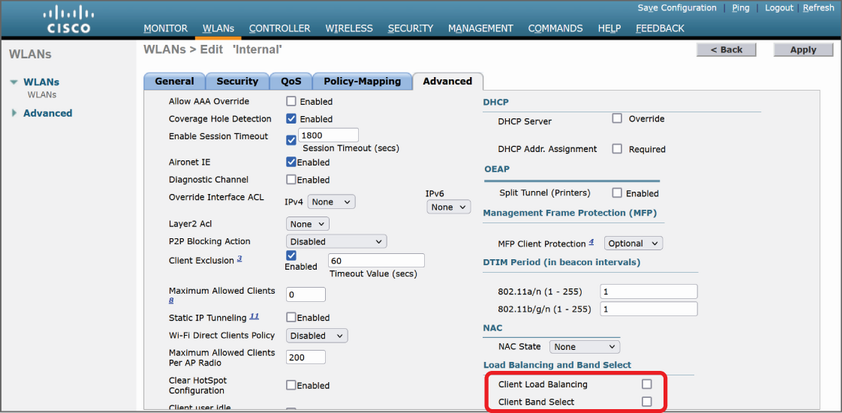
The Advanced-tab figure locates Client Band Select alongside Client Load Balancing and shows the feature’s WLAN configuration context. section 21.3.3

How Acing the CCNA Exam: Volume 2 Advanced Networking and Security covers it

How deep it goes
Defines probe-response delaying and GUI configuration, but does not describe command-line configuration or troubleshooting.
Examples
Uses the WLC Advanced tab and Figure 21.20 to illustrate enabling Client Band Select.
What you can do after
Configure it per WLAN from the WLC Advanced tab and apply the resulting settings.
How it connects
Links WLAN configuration with LWAPs, WLCs, 2.4 GHz, 5 GHz, and Client Load Balancing.

Related concepts

This explainer was generated by Manning's knowledge graph from the text of Acing the CCNA Exam: Volume 2 Advanced Networking and Security. The section links point to the parts of the book it draws on.