A client component is the browser-rendered, interactive part of a React application. In a React Server Components architecture, server components render on the server while client components handle interactions where they are needed. Keeping sensitive operations on the server also avoids exposing API keys to the browser. section 4.1.1 section 8.1.2
For an AI chat, a client component accepts a prompt and calls a Next.js server action. The action processes conversation history, calls the AI provider, and returns a streamed response. The client displays updates as they arrive, without requiring an explicit API route. section 4.1.2
Run the chat example
Run `npm run dev -w ch04/chat-rsc`. Configure `GEMINI_API_KEY` in `.env` for provider access; keep the key and provider call on the server. The example separates AI processing from the client component responsible for user interaction. section 4.1.2
Figure 4.4 React server actions in action. User input travels from the prompt to the AI provider. The response is streamed back in chunks, updating the client in real time while maintaining the conversation state in memory.
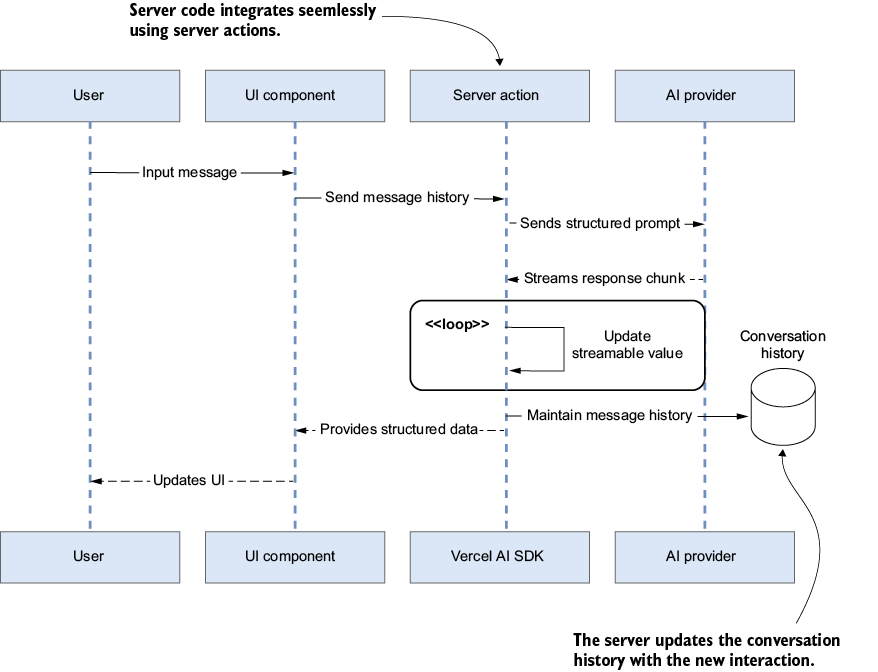
Follow the prompt from the client component through the server action to the AI provider, then trace streamed response chunks back to the UI. section 4.1.2
When an interaction fails, check both sides of the boundary. React DevTools can inspect client props, state, and performance; console logs and server-side debugging help trace the request and response. Streaming behavior may also depend on the deployment runtime and its limits. section 8.1.2
