React Server Components (RSCs) run selected parts of a React application on the server and send their rendered output to the client. Unlike traditional server-side rendering, server components do not hydrate in the browser. Client components supply interactivity where it is needed. This boundary can reduce shipped JavaScript, keep sensitive operations off the client, and let components fetch data directly on the server. section 4.1 section 4.1.1
Figure 4.3 RSCs allow specific parts of a React application to be rendered on the server. The components can be streamed to the client incrementally, allowing the client to begin rendering parts of the UI before the entire page is ready.
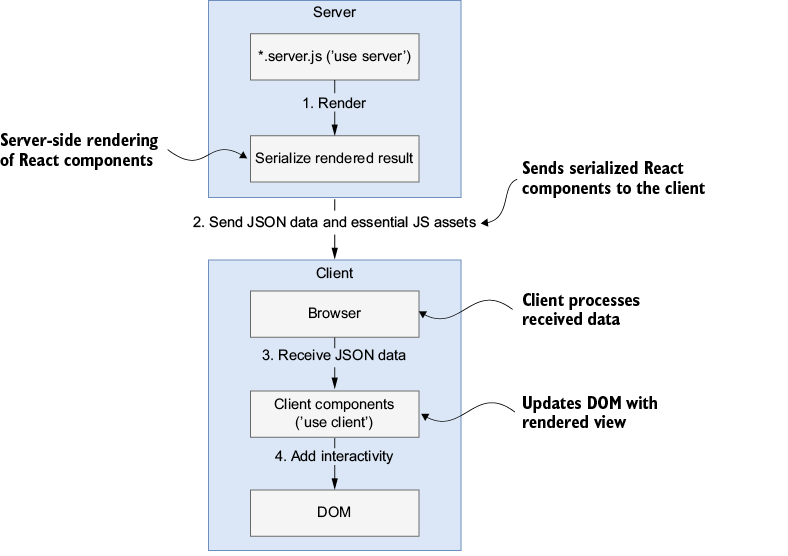
The rendering diagram shows which parts of the component tree run on the server and how their output can reach the client incrementally. section 4.1.1
For a streaming AI conversation, divide the work at the server–client boundary:
- Keep the prompt and interactive conversation display in a client component. section 4.1.2 section 8.1.2
- Send the conversation history to a server action, which selects an AI model and calls the provider. Keep credentials and model-facing operations on the server. section 4.1.2 section 4.1.1
- Stream response chunks back to update the display. Treat client-held history as convenient UI state, not implicitly trusted server state. section 4.1.2 section 4.0
Stream a conversation response
In a Next.js App Router chat project, a `continueConversation(history, provider, model)` server action uses `streamText` from `ai` and `createStreamableValue` from `ai/rsc`. It reads `textStream`, calls `stream.update(text)` for each chunk, then calls `stream.done()`. The action returns the history and `stream.value` for the client to display. Run the supplied project with `npm run dev -w ch04/chat-rsc`; provider access requires a Google API key in the project environment. section 4.1.2
Listing 4.1 Server action that creates a streamable conversation
'use server';    #1
import { streamText } from 'ai';
import { createStreamableValue } from 'ai/rsc';    #2

export async function
continueConversation(history, provider, model) {
  'use server';
  const supportedModel = getSupportedModel(provider, model);
  const stream = createStreamableValue();    #3
  (async () => {
    const { textStream } = await streamText({
      model:  supportedModel,
      system: "I'm happy to assist you in any way I can.
How can I be of service today?",
      messages: history,
    });

    for await (const text of textStream) {   #4
      stream.update(text);
    }

    stream.done();
  })();

  return {   #5
    messages: history,
    newMessage: stream.value,
  };
}
The server-action listing shows the stream lifecycle and the value returned to the client. section 4.1.2
When troubleshooting, inspect the component boundary as well as the stream: React DevTools can inspect the component tree, while a Node.js debugger and logs can trace server execution. Check deployment runtime limits too; a stream that works locally may behave differently on a hosted runtime. section 8.1.2
