A clipping path selectively hides part of an element using a mathematically defined shape rather than an image. Apply it with the CSS clip-path property to create circles, ellipses, polygons, rectangles, or custom paths. section 14.3 section 14.5
Choose a shape function according to the visual constraint:
- Use circle() for a circular reveal; provide a radius and optionally reposition the center with at and x/y coordinates. section 14.3
- Use ellipse() when horizontal and vertical radii need separate control. section 14.3
- Use polygon() for arbitrary straight-edged shapes, specifying coordinate pairs for each vertex. section 14.3.1
- Use inset() for an edge-inset rectangle or path() for complex SVG curves; path() generally depends on vector-editing software. section 14.3.3
Reveal an image through a circular region
Apply a radius equal to half the image width: .clipped { clip-path: circle(398px); }. Reposition the region with a declaration such as .clipped { clip-path: circle(229px at 337px 293px); } to isolate a different part of the image. section 14.3
Figure 14.7 A rectangular image with a circular clipping path applied
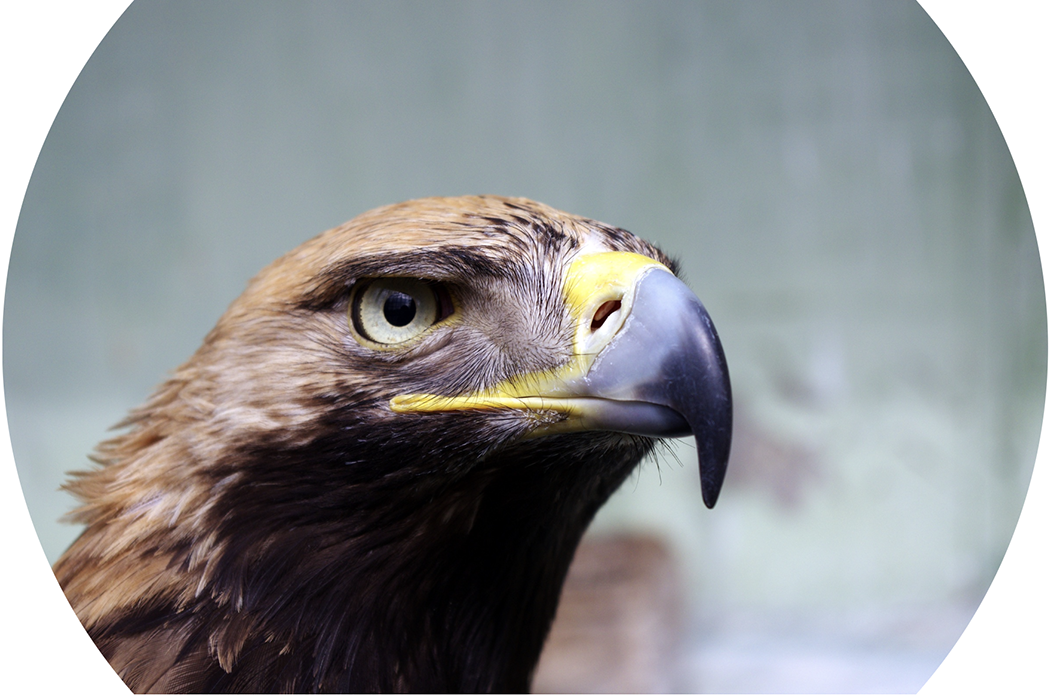
View the circular clipping result: a rectangular image retains only the portion inside the circular path. section 14.3
Polygon coordinates can emphasize a subject or carve a decorative border. Firefox DevTools provides interactive handles for adjusting circles, ellipses, and polygon vertices, including adding polygon points. section 14.3.1 section 14.3.2
