A stacking context is an isolated group of elements painted together by the browser. Its root establishes the group’s position in the surrounding stacking order, so descendants cannot be interleaved with elements outside it. section 6.4.3
The issue commonly appears when positioned interface elements overlap. A dropdown can appear in front of a modal simply because its markup or stacking order places it above the modal. section 6.4
Use these rules to reason about stacking:
- Applying z-index to a positioned element creates a new stacking context; z-index does not affect static elements. section 6.4.2
- A descendant with a very high z-index still cannot escape its parent context. If that context is behind another context, the descendant remains behind it. section 6.4.3
- Opacity below 1, transform, filter, and fixed positioning can also create stacking contexts. section 6.4.3
A nested element cannot escape its context
Make two overlapping boxes positioned with z-index: 1. Place an absolutely positioned nested element inside the first box and give it z-index: 100. Even with the larger value, it remains behind the second box when its parent context is behind that box. Change each z-index in developer tools to observe the boundary. section 6.4.3
Figure 6.10 The modal dialog incorrectly appears behind the dropdown menu.
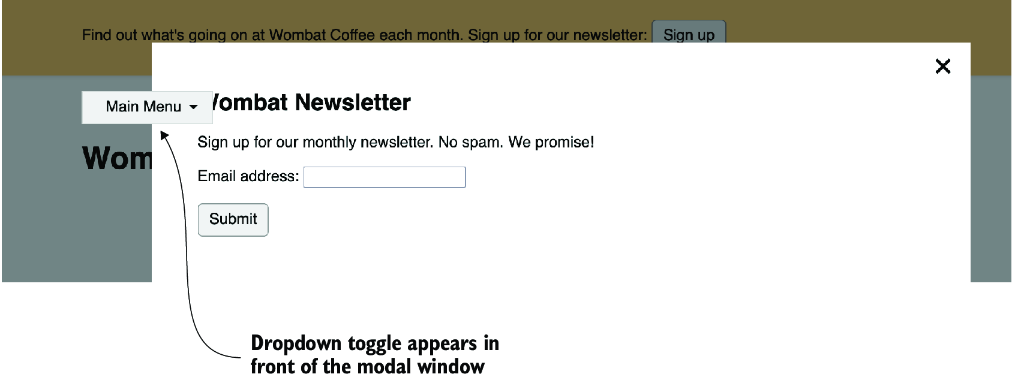
Use the modal-and-dropdown figure to inspect the visible failure that stacking contexts help diagnose. section 6.4
Listing 6.11 Bringing the modal to the front with z-index
.modal-backdrop {
  position: fixed;
  inset: 0;
  background-color: rgb(0 0 0 / 0.5);
  z-index: 1;           #1
}

.modal-body {
  position: fixed;
  inset-block: 3em;
  inset-inline: 20%;
  padding: 2em 3em;
  background-color: white;
  overflow: auto;
  z-index: 2;         #2
}
Use the modal CSS listing to compare backdrop and dialog layers established with z-index. section 6.4.2
