A cloud-based AI service runs the AI model on a provider’s server. You enter a prompt in an application; the prompt crosses the internet to the service, and the response travels back. With local AI, the prompt, model, and response stay on your computer. That boundary matters when you decide what data to send. section 1.1.1
Figure 1.1 Cloud AI (right) sends your prompt across the internet to a hosted inference service, and your data may be stored on the company’s servers. Local AI (left) keeps the prompt, the model, and the response inside your machine: no network hop, no external server, and no data leaving your control.
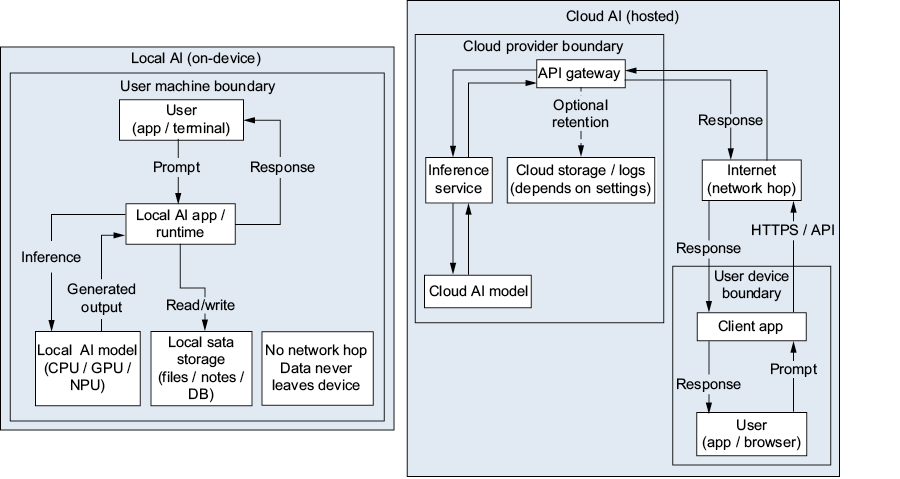
Follow the prompt and response in each direction to see where data leaves your machine. section 1.1.1
Cloud AI is useful when a task calls for the strongest available models, the latest updates, or possibly real-time information—and the content is not sensitive. It needs an internet connection. Your data reaches company servers and may be stored there, while service prices, terms, and features can change. Local AI offers offline use and more control, but its models are generally smaller and are frozen at their training cutoff date. section 1.1.1 section 1.1.2 section 1.1
Table 1.1 A comparison of cloud AI services and local AI (Ollama) across key dimensions
| Feature |
Cloud AI (ChatGPT, Gemini, Claude) |
Local AI (Ollama) |
|---|---|---|
| Model size |
Very large (hundreds of billions of parameters) |
Smaller (1B to 70B+ parameters) |
| Response quality |
State-of-the-art for complex tasks |
Excellent for many tasks; improving rapidly |
| Accuracy/recency |
Continuously updated; may have real-time data |
Frozen at the training cutoff; no real-time data |
| Privacy |
Your data is sent to company servers |
Your data never leaves your machine |
| Cost |
Free tiers are available; paid plans for heavy use |
Completely free (you pay only for electricity) |
| Internet required |
Yes, always |
No; works fully offline |
| Speed (first response) |
Depends on server load and network |
Depends on your hardware |
| Availability |
Can go down during outages |
Always available if your computer is on |
| Customization |
Limited to what the service offers |
Full control over model selection and parameters |
| Data retention |
Company may store your conversations |
You control everything |
| Hardware needed |
Any device with a browser |
Capable local machine (8 GB+ RAM recommended) |
Compare quality, recency, privacy, cost, connectivity, and availability before choosing where to run a task. section 1.1.1
Choose the location to fit the task
Use cloud AI for a difficult, nonsensitive task that needs maximum capability. For a private voice application, keeping the AI local means the audio need not leave your computer. On a ship or at a remote research station without internet access, a laptop with Ollama and an already-downloaded model can still work. You can use both approaches for different tasks. section 1.1.2 section 1.1 section 14.4.8
