Cloud workload protection continuously monitors cloud environments for suspicious activity and potential signs of compromise. When activity reaches a high level of suspicion, Microsoft Defender for Cloud generates a security alert with investigation details. It complements security hygiene: fixing misconfigurations reduces exposure, while monitoring helps identify attacks that still occur. section 6.5.2 section 7.1
Defender for Cloud distributes monitoring across stages of the kill chain, covering activity from initial probing through lateral movement and attempted data exfiltration. Capabilities are organized into resource-specific Defender plans because monitoring virtual machines, containers, databases, key vaults, and other workloads differs. section 7.1 section 7.0
Common workload-protection plans include:
- Microsoft Defender for Servers, App Service, Azure SQL Databases, SQL Servers on Machines, Open-Source Relational Databases, Azure Cosmos DB, Storage, Containers, Key Vault, Resource Manager, and DNS. section 7.2
- Email notifications can alert relevant stakeholders when security alerts are generated. section 7.11
- Workflow automation can invoke Logic Apps and integrate alerts with IT service management or messaging platforms. section 7.11
- Continuous export can stream Defender for Cloud data to Event Hubs or Log Analytics workspaces, while workbooks provide visual monitoring. section 7.11
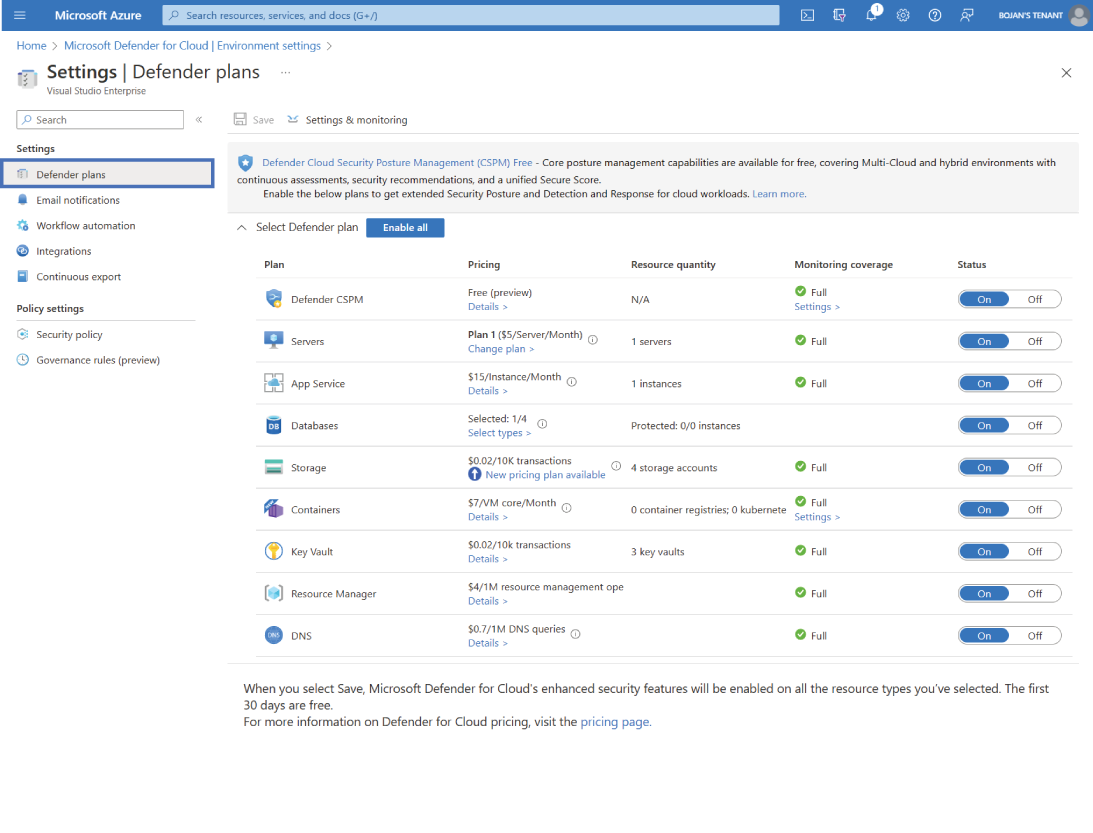
Use the plan overview to compare the Defender for Cloud protections available for an Azure subscription. section 7.2
