A CNAME (canonical name) record creates a DNS alias by mapping one domain name to another instead of directly mapping it to an IP address. section 3.1.5
Key behaviors and distinctions:
- Maps names such as www.example.com to example.com, allowing both names to reach the same website. section 3.1.5
- Differs from an A record, which maps a domain name directly to an IPv4 address; AAAA records map to IPv6 addresses. section 3.1.5
- Appears among DNS records handled through recursive resolution and caching. section 3.3
Website alias
A DNS zone can use a CNAME so www.example.com points to example.com. Visiting either name then reaches the same page. section 3.1.5
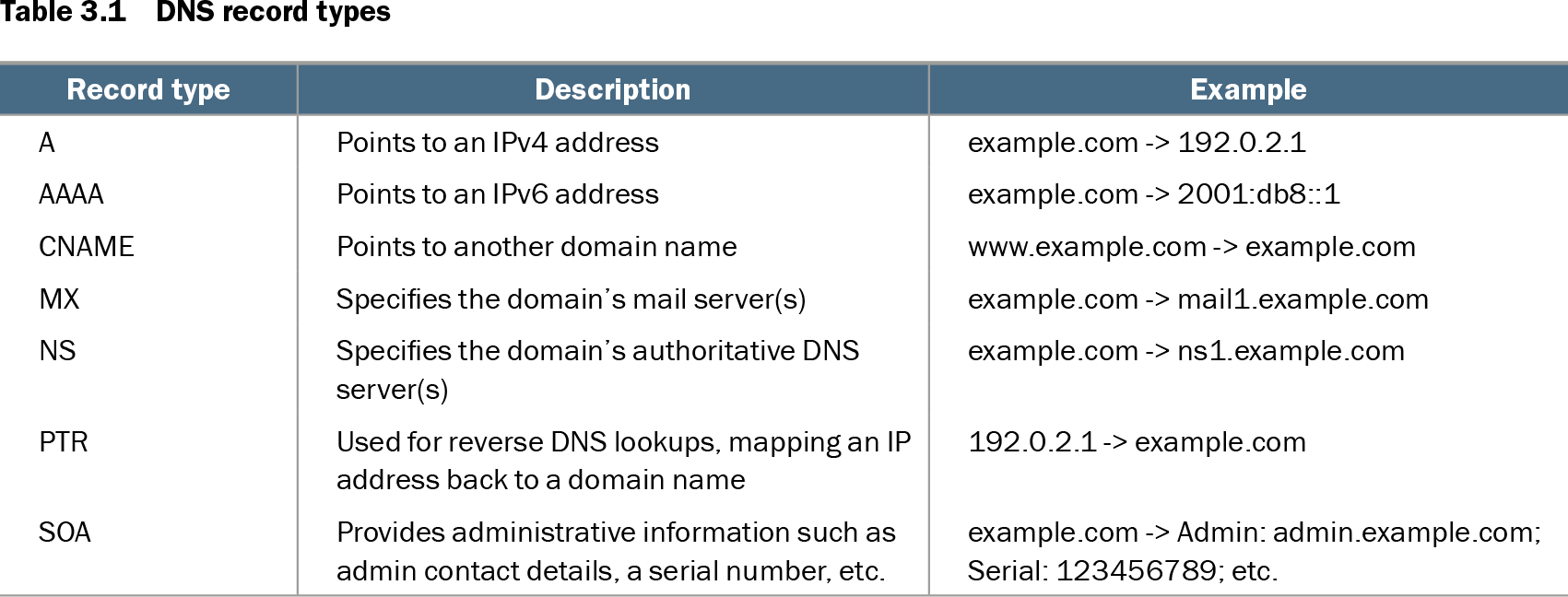
Table 3.1 DNS record types (view table figure)
| Record type |
Description |
Example |
|---|---|---|
| A |
Points to an IPv4 address |
example.com -> 192.0.2.1 |
| AAAA |
Points to an IPv6 address |
example.com -> 2001:db8::1 |
| CNAME |
Points to another domain name |
www.example.com -> example.com |
| MX |
Specifies the domain’s mail server(s) |
example.com -> mail1.example.com |
| NS |
Specifies the domain’s authoritative DNS server(s) |
example.com -> ns1.example.com |
| PTR |
Used for reverse DNS lookups, mapping an IP address back to a domain name |
192.0.2.1 -> example.com |
| SOA |
Provides administrative information such as admin contact details, a serial number, etc. |
example.com -> Admin: admin.example.com; Serial: 123456789; etc. |
Compare CNAME behavior with A, AAAA, MX, NS, PTR, and SOA records in the DNS record-type table. section 3.1.5