Cognitive load is the mental effort needed to understand and act on an interface. A page becomes harder to use when people must first work out which items belong together, what repeated styles mean, or where to find the next action. Clear relationships and familiar patterns reduce that effort, helping people scan rather than decode the screen. section 2.1.1 section 2.1.3
Use proximity to turn related information into visible groups. Keep a heading close to its supporting copy, leave more space before the next topic, and divide long forms into labeled sections. These chunks make a dense page less overwhelming and give people natural places to pause before continuing. section 2.1.1
A checkout form
A single run of input fields can look like a wall of content. Grouping billing fields separately from payment fields, with section headings, makes the required information easier to scan and understand. The same groups can be reflected in separate div containers, so the frontend code is easier to scan when edited later. section 2.1.1
Repetition lowers effort by making patterns predictable. Reuse colors, fonts, component styles, and action treatments when they carry the same meaning. For example, repeated headline and body styles teach readers how to recognize article listings; a consistently colored Add to Bag button makes the intended action easier to find. Do not repeat styles arbitrarily: differences in size or color without a clear reason make a page feel disorganized. section 2.1.3
When reviewing an interface, ask:
- Can someone tell which text, fields, images, or controls belong together from spacing and headings? section 2.1.1
- Does each repeated visual treatment communicate the same type of content or action? section 2.1.3
- Are important actions separated from competing navigation controls so they are easier to locate? section 2.1.1
Figure 2.14 If we group related input fields and add section headings, the checkout form becomes easier to parse when scanning it.
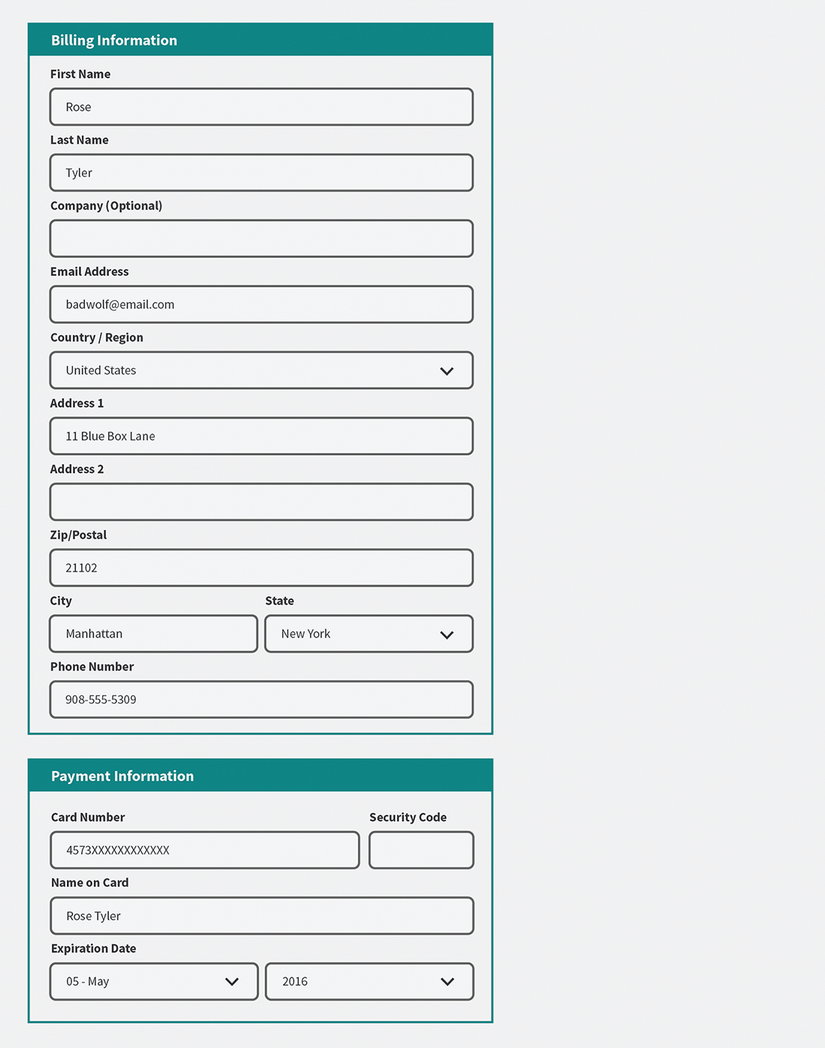
Compare the ungrouped form with a version organized into labeled sections to see how chunking makes the information easier to parse. section 2.1.1





