A collision force keeps simulated nodes from overlapping. In D3, d3.forceCollide() sets a minimum center-to-center distance through its radius() accessor. For circles with radius 10, a collision radius of 12 leaves 2 px of padding between their edges. section 12.4.1 section 12.5
Collision is one force in a real-time force layout. Combine it with forceX() or forceY() to pull nodes toward positions while preserving space between them; without positioning forces, non-overlapping nodes gather into a circular cluster. section 12.4.1 section 12.4
Build a beeswarm plot
Create nodes with numeric values, then run a force simulation with forceX(d => xScale(d.value)), forceY(0), and forceCollide().radius(7). The x-force places each point by value, the y-force draws points toward the centerline, and collision separates them into a beeswarm-like distribution that retains individual points. section 12.4.1
For nodes with different visual sizes, derive each node’s radius and pass a radius accessor such as d => d.radius + 2. The added value creates visible spacing around circles instead of merely preventing their edges from touching. section 12.4.1
Figure 12.14 The collision force d3.forceCollide() prevents the nodes from overlapping. By setting its radius() accessor function, we impose a minimum distance between the center of each node. Without positioning forces, the nodes naturally aggregate into a circle. If we combine the collision force with a positioning force, we obtain a flattened shape that resembles a beeswarm chart.
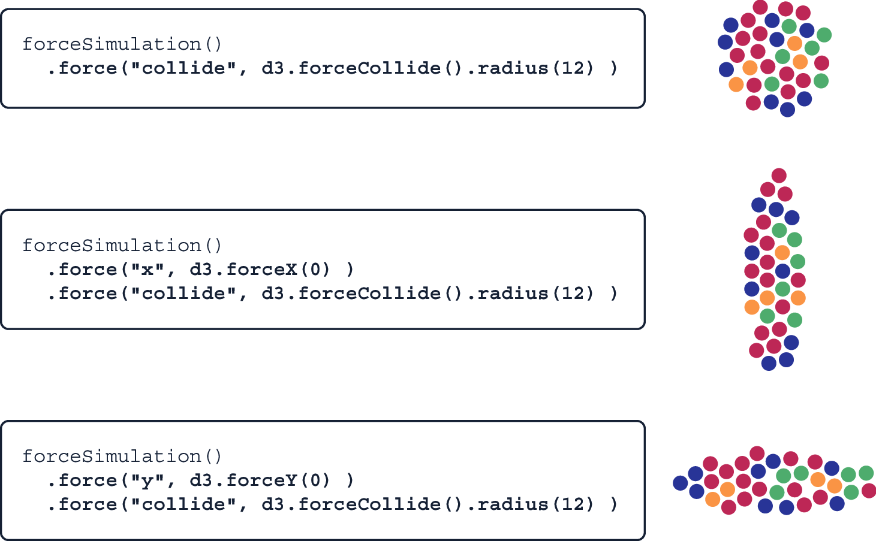
Compare the circular cluster produced by collision alone with the flattened beeswarm shape produced when a positioning force is added. section 12.4.1
