A column is a vertical subdivision of a .NET MAUI Grid. Columns let you position child views in a flexible interface instead of relying on fixed coordinates. Column indexes start at 0, and a Grid can define both the number and relative size of its columns. section 5.1.1
Define columns according to the space each part of the interface needs:
- Use proportional definitions such as *, 5*, * to give the middle column five times the available space of either outer column. section 6.1
- Place child views with column indexes, such as columns 0 and 2 for navigation controls. section 6.1
- Use ColumnSpan when a view should occupy multiple columns or when lower sections must stretch across the complete grid. section 6.1
- Nest another Grid when a page section needs its own column structure. section 6.1
Calculator and message layouts
A calculator can use four columns for its buttons, with controls placed in columns 0 through 3. An Outlook-style message template can use ColumnDefinitions="50,*,50": the avatar occupies the first column, content uses the flexible middle column, and the time uses the last column. The avatar can span three rows, while a message preview can span into the third column. section 5.1.1 section 6.4.8
Figure 6.24 The message template for the Inbox can be laid out as a Grid, with three columns and three rows. The avatar will reside in the first column and row and will have a row span of 3 (there’s nothing else in the first column). The sender’s name will go into the first row, second column. The subject will go into the second row, second column, and the message body preview will go into the third row, second column, and will span into the third column. The time or day when the message was sent will go into the first row, third column.
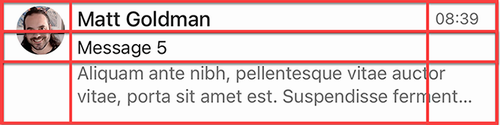
Use the message-template layout to see how columns, row spans, and content placement combine in a practical Grid. section 6.4.8
