liveBook · Manning

Complementary color relationship

As explained in Web Design Playground, Second Edition

A complementary color scheme pairs colors whose hues are opposite each other on the color wheel.

A complementary color relationship pairs hues opposite each other on the color wheel. In hsl(), their hue values are 180 degrees apart. section 17.6

Use the relationship to create contrast without letting the colors wrestle for control:

  • Choose one hue as the page’s main color and use its complement as an accent. section 17.6
  • Reserve the accent for attention-grabbing elements such as Subscribe or Buy buttons. section 17.6
  • Calculate a complement by adding or subtracting 180 degrees from the main hue. section 17.7

Red’s opposite

Red, hsl(0, 100%, 50%), pairs with hsl(180, 100%, 50%). One can carry the page while the other provides a bright accent. section 17.6

Figure 17.11 Use the Web Design Playground’s Color Scheme Calculator to generate a color scheme for a given RGB code.
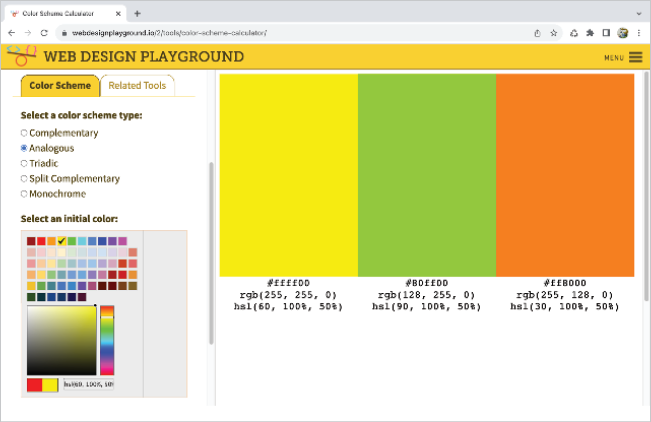
Use the Color Scheme Calculator to generate complementary colors from an RGB value, hex triplet, rgb(), color keyword, or hsl() value. section 17.7


How Web Design Playground, Second Edition covers it

How deep it goes
Defines 180-degree hue opposition, gives an HSL example, and recommends main-color and accent roles.
Examples
Uses red hsl(0, 100%, 50%) with hsl(180, 100%, 50%), plus Subscribe and Buy buttons as accent examples.
What you can do after
Apply it via CSS color values and generate complementary palettes with the Web Design Playground Color Scheme Calculator.
How it connects
Connects the color wheel, HSL, RGB, hex colors, color schemes, and call-to-action design.

Also explained in

Compare how 5 books explain complementary color relationship →

Related concepts

This explainer was generated by Manning's knowledge graph from the text of Web Design Playground, Second Edition. The section links point to the parts of the book it draws on.


