Compression makes data smaller, but its performance value is not limited to saving disk space. When moving raw data from RAM or storage is expensive, processing a smaller representation can take less time even after decompression. The result depends on the data, the compressor, and the memory hierarchy. section 6.2 section 1.2.1
Benchmark the complete operation, not just compression. A NumPy baseline can write arrays with `np.save` and read them with `np.load`; a Blosc alternative can use `pack_array` and `unpack_array`. Test contrasting inputs: zeros compress readily, repeated values have exploitable patterns, and random values compress poorly. Flush write buffers before timing disk writes, and account for operating-system caches when timing reads; cache invalidation is platform-dependent. section 6.2.1 section 6.2.2
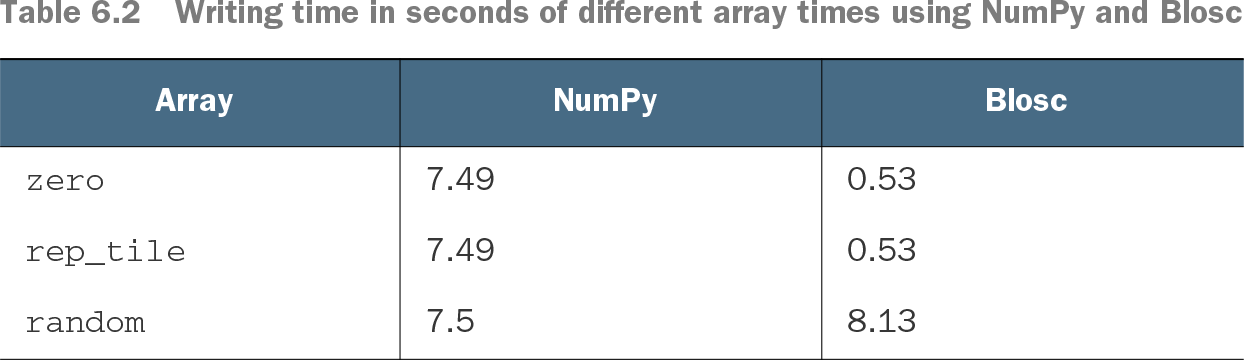
Table 6.2 Writing time in seconds of different array times using NumPy and Blosc (view table figure)
The write timings show the reversal: Blosc takes 0.53 seconds versus NumPy’s 7.49 seconds for zeros and repeated tiles, but loses slightly on random data. section 6.2.1
For the same arrays, Blosc reads zeros and repeated tiles in about 0.6 seconds versus roughly 7 seconds with NumPy; random data takes 8.58 seconds with Blosc versus 7.37 seconds with NumPy. Repeated tiles occupy about 200 times less disk space with Blosc, while random data stays about the same size. Compression is therefore a measured choice, not a default speedup. section 6.2.1 section 6.2.2
Algorithm and representation choices change the trade-off. On repeated tiles, Blosc with LZ4 compresses in 527 ms to 5,204 KB; Zstandard takes 919 ms but produces 366 KB. Bit shuffling rearranges the input into a more regular pattern: one test reduces the result from 5,345,500 to 4,600,034 bytes, with a small compression-time increase. section 6.2.3 section 6.2.4
Compressed CSV is not always faster
Reading a 566 MB CSV with pandas takes about 10 seconds. Its 74 MB xz-compressed version takes about 15 seconds to open. Choose according to whether disk space or opening time matters more, and rerun the comparison on your own data and hardware. section 7.1.1
Compression also appears alongside column encoding in Parquet, where columnar storage lets a reader access only needed columns. That is a separate format decision from choosing a compressor for an array or CSV file. section 8.2