Conditional access applies different security policies according to the access scenario. It combines identity, application, location, device, and risk information to control access to Azure services and applications. This supports layered identity protection beyond standalone MFA or identity protection policies. section 2.2.7 section 2.14
Build a conditional access policy from three elements:
- Assignments identify the users, groups, workload identities, and cloud applications or actions covered by the policy. section 2.2.7
- Conditions evaluate factors such as sign-in risk, IP location, device information, and application context. section 2.2.7
- Controls block access or grant access with safeguards such as requiring multifactor authentication. section 2.2.7
Require MFA for Azure management tasks
In the Azure portal, open Azure Active Directory > Security > Conditional Access and create a policy for Bob. Select Microsoft Azure Management under Cloud Apps or Actions, exclude trusted locations, and grant access while requiring MFA. Set the policy to Report-Only so its effects can be evaluated before switching it to On. A related exercise requires MFA when sign-in risk is medium or high. section 2.2.8 section 2.12
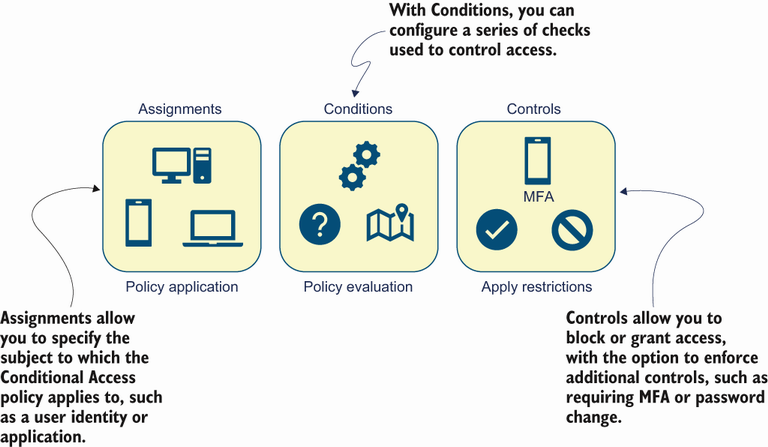
Use the simplified flow to connect assignments and conditions with the resulting access controls. section 2.2.7
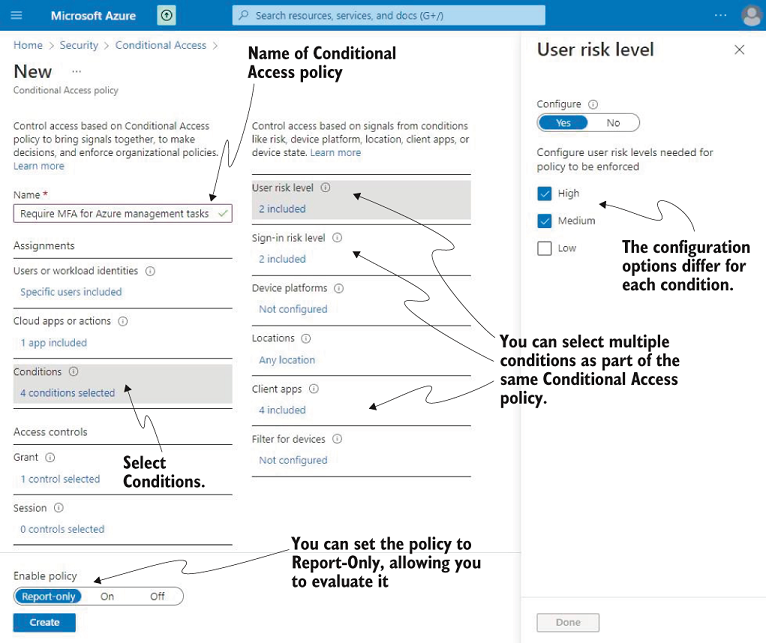
Use the portal configuration view to follow the policy setup and locate its principal options. section 2.2.8

