A conditional breakpoint pauses execution at a chosen line only when its Boolean condition is true. It filters out cases that do not matter to your investigation, so you can focus on relevant values without stepping through every execution. section 3.1
Use a conditional breakpoint to:
- Pause only when a variable has the value you want to investigate, such as when sum is zero. section 3.1
- Log selected values or a stack trace without suspending execution or adding log instructions to the code. section 3.2
Investigating a zero sum
In a method that sums digits extracted from strings, set a breakpoint on the line handling sum and make its condition sum == 0. The debugger skips other cases and pauses when the value matches. section 3.1
Figure 3.1 Using a conditional breakpoint to pause the execution just for specific cases. In this figure, we want to pause the execution on line 14 only if sum is zero. We can apply a condition on the breakpoint that instructs the debugger to consider that breakpoint only if the given state is true. This helps you more quickly get to a scenario you want to investigate.
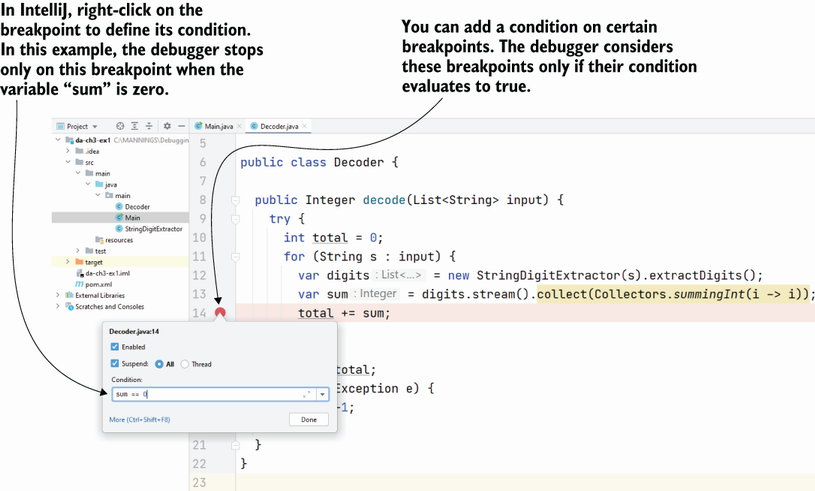
See how a condition limits pauses to the cases relevant to an investigation. section 3.1