A configuration is a set of settings that determines how a Kafka component behaves. For a client, name-value parameters let the client library handle connection, serialization, batching, partition selection, and retries without putting those decisions into application code. Keeping configuration files separate from code makes it easier to use different settings across environments and change parameters without redeploying the service. section 3.1.2 section 3.0
Producer for a Customer 360 operational data store
A producer configuration identifies the brokers it can contact, selects serializers, and assigns a client ID that makes the service recognizable in logs and metrics. In an on-premises proof of concept, the team must also ensure broker connections are permitted through firewalls. Its decision to defer secured communication is a proof-of-concept constraint, not a production default. section 3.1.6
Configuration also defines integration and cluster artifacts. A Kafka Connect source connector can load database records into a topic from a deployed configuration rather than a purpose-built producer. That speed comes with a governance question: direct database integration may expose the database model to the integration layer and bypass data contracts. Topic configurations likewise express choices about performance, reliability, and retention. section 7.3.9 section 2.6
Listing 7.1 Configuration of the JDBC source connector
{ "name": "jdbc-source-transactions",
  "config":
    {"connector.class": "JdbcSource",  #1
     "tasks.max": 1,  #2
     "topic.prefix": "connect-",  #3
     "connection.url": "jdbc:postgresql://postgres:5432/trans_db",  #4
     "mode": "incrementing",  #5
     "incrementing.column.name":"ID",  #6
     "value.converter": "io.confluent.connect.avro.AvroConverter",  #7
     "value.converter.schema.registry.url":"http://schema-registry:8081",  #8
     "table.whitelist" : "public.transactions",  #9
     "connection.user": "demo",
     "connection.password" : "demo"
    }
}
The JDBC source connector listing shows the concrete shape of an integration configuration: connection details, a selected table, an incrementing ID column, a topic prefix, and a value converter. section 7.3.9
For shared Kafka infrastructure, configuration is also a change-management artifact. A GitOps approach stores the desired cluster state as YAML or JSON in Git. A CI/CD pipeline compares that state with the cluster and applies necessary changes; periodic validation can detect direct edits that cause drift. Before upgrades, back up configuration files and test for deprecated settings or changed behavior in a staging environment. section 10.2.2 section 11.1
Figure 10.1 Applying Kafka cluster modifications via GitOps: after the updated Kafka cluster configuration is pushed, the CI/CD pipeline retrieves the current cluster state, calculates the required modifications, and applies them.
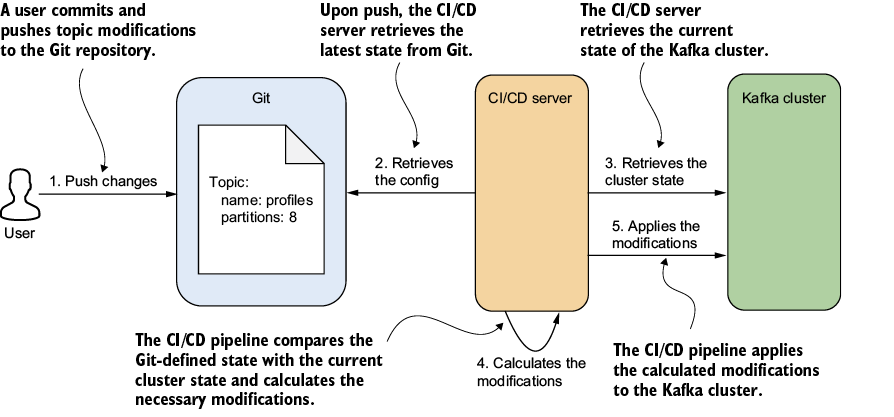
The diagram traces a configuration change from Git through comparison with the running cluster to the modifications applied by the CI/CD pipeline. section 10.2.2






















