A site can work for one visitor and still put barriers in another’s way. Accessibility conformance asks whether its content and functionality meet applicable accessibility requirements, including for people using different input methods or assistive technologies. It is a way to check whether access holds across those experiences—not a box to tick once. section 1.5.2
The Web Content Accessibility Guidelines (WCAG) organize requirements under four principles: perceivable, operable, understandable, and robust. Their testable success criteria determine conformance at levels A, AA, and AAA. The levels are cumulative: AA includes A, while AAA includes both A and AA. Success criteria state what must be met; accompanying explanations and techniques help teams meet them but are not themselves required for conformance. section 1.5 section 1.5.1
Figure 1.2 This image illustrates the various components in WCAG 2.2. Guidelines are organized under four principles. Each of the 13 guidelines includes normative success criteria: the requirements used to determine conformance at levels A, AA, or AAA. WCAG also provides informative supporting material, including techniques, understanding documents, testing rules, and additional guidance to help explain and apply those requirements.
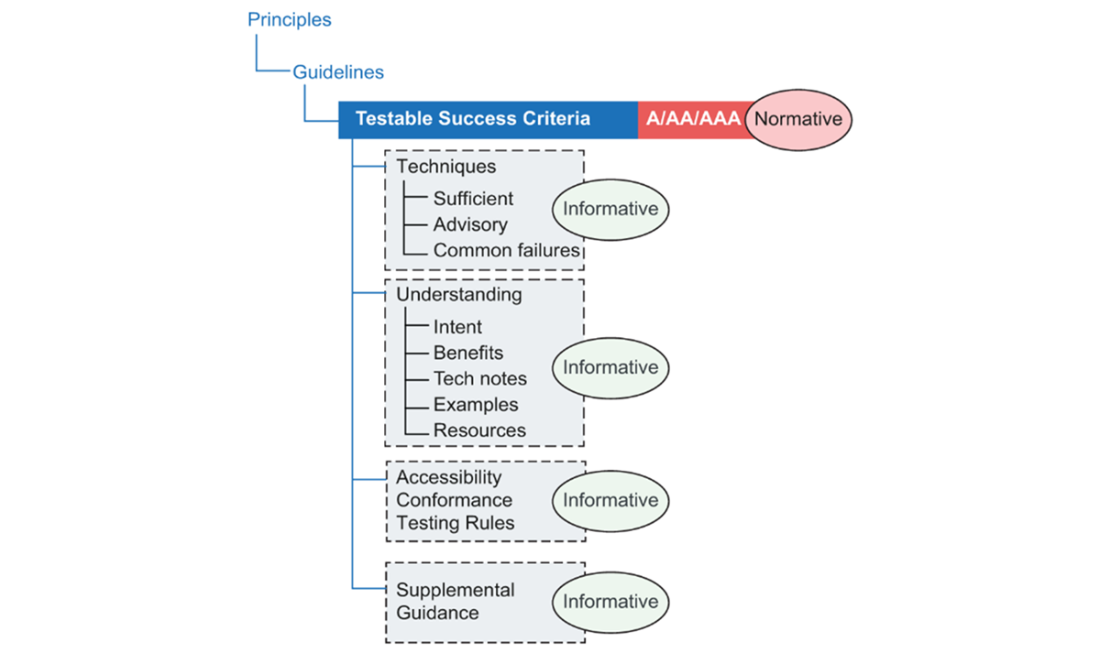
Use this map to distinguish the success criteria that determine conformance from the supporting guidance that helps implement them. section 1.5.1
Scope a Level AA check
Suppose you are checking a site against WCAG 2.2 Level AA. Start with an inventory of images, text, forms, video, icons, and animations; follow common journeys from the home page. If the site has no audio or video, time-based-media requirements are out of scope for now. Add a video later, and the scope changes. Likewise, having no images of text may make one criterion in the Distinguishable guideline inapplicable, without removing the rest of that guideline from consideration. section 1.5.2
TIP: Use the WCAG Quick Reference to filter guidelines, success criteria, techniques, and failures for the technology you are developing. Treat the applicable success criteria as accessibility acceptance criteria, then use the supporting guidance to work out how to meet them. section 1.5.1
NOTE: Recheck conformance when pages, content, features, or code change. An inventory establishes what to examine; it is not a pass/fail audit. Keeping these checks in the workflow helps accessibility remain part of product quality rather than a one-time milestone. section 1.5.2 section 1.7
