A content inventory is a structured spreadsheet or document that records the content associated with a website or application and its key attributes. It gives redesign teams a concise view of what exists and helps new-project teams keep required content in one place. section 5.1.2
Useful inventory fields include:
- Page where the content lives and related page metadata section 5.1.2
- Content title or summary, author, and URL section 5.1.2
- File format, such as an image, article, user-interface element, or downloadable file section 5.1.2
- Content description and creation date, when available section 5.1.2
Use an inventory for an existing site before a redesign, or for a new site to outline content that still needs to be written. Keep it separate from a content audit: the inventory documents what exists, while the audit evaluates whether content should be kept, rewritten, or removed. section 5.1.2 section 5.1.2
A practical project spreadsheet
For a website redesign, create one row per content asset and group rows by page or another useful factor. Recording the page, title, URL, format, description, author, and date creates a low-cost overview that can support later inventory or audit work. section 5.1.2
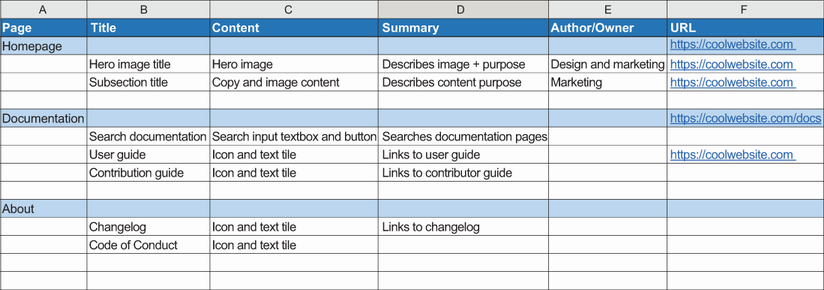
Use the example spreadsheet as a visual starting point for organizing inventory columns and content rows. section 5.1.2
