A main navigation menu gives users access to a website’s top-level sections. Build it from a sitemap and content inventory, but treat those artifacts as guides rather than complete navigation systems. section 5.1.1
Make the menu support both organization and wayfinding:
- Use user research, including card sorting, to learn how visitors expect content to be grouped. section 5.1.1
- Keep the main menu focused on top-level landing points, especially when the site extends several levels deep. section 5.1.1
- Add secondary navigation and breadcrumbs so users can navigate deeper sections and understand where they are. section 5.1.1
A deeper website
A header menu can open a dropdown containing second-level landing pages. When users continue into third- or fourth-level content, a sidebar can provide section navigation and show the path back to the page they came from. section 5.1.1
Figure 5.4 The navigation on this website extends deeper, beyond what’s available in the header navigation. The sidebar on the right serves as navigation to the site’s deeper levels and as a wayfinding tool to let the user know where they clicked from.
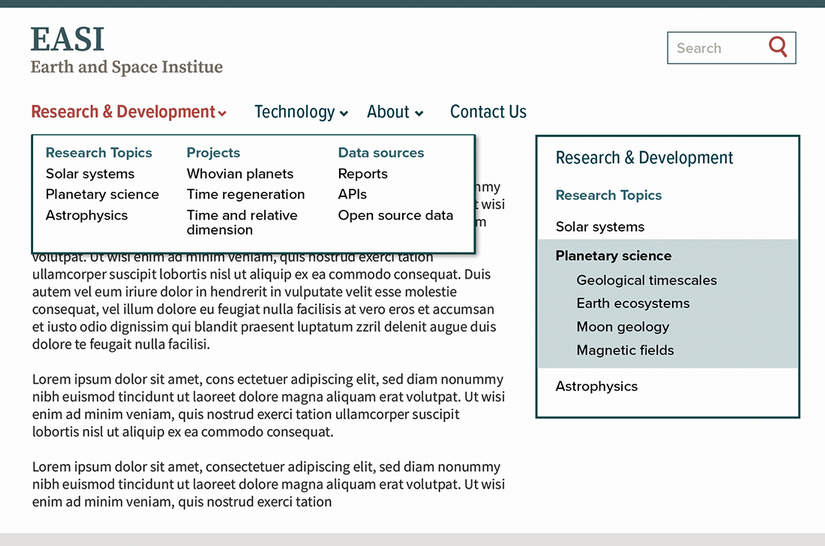
See how header navigation, deeper section links, and a sidebar wayfinding tool work together. section 5.1.1
