liveBook · Manning

Secondary navigation menu

As explained in Design for Developers

A secondary navigation menu is a navigation control for accessing pages or sections below a website’s top-level navigation.

A secondary navigation menu helps users move through pages below the website’s top-level navigation. It also shows where they are within deeper sections. section 5.1.1

A deeper website section

A top menu may lead to a second-level landing page, which opens further pages three or four levels deep. A sidebar can provide links to those deeper sections while showing the path back to higher levels. section 5.1.1

Figure 5.4 The navigation on this website extends deeper, beyond what’s available in the header navigation. The sidebar on the right serves as navigation to the site’s deeper levels and as a wayfinding tool to let the user know where they clicked from.
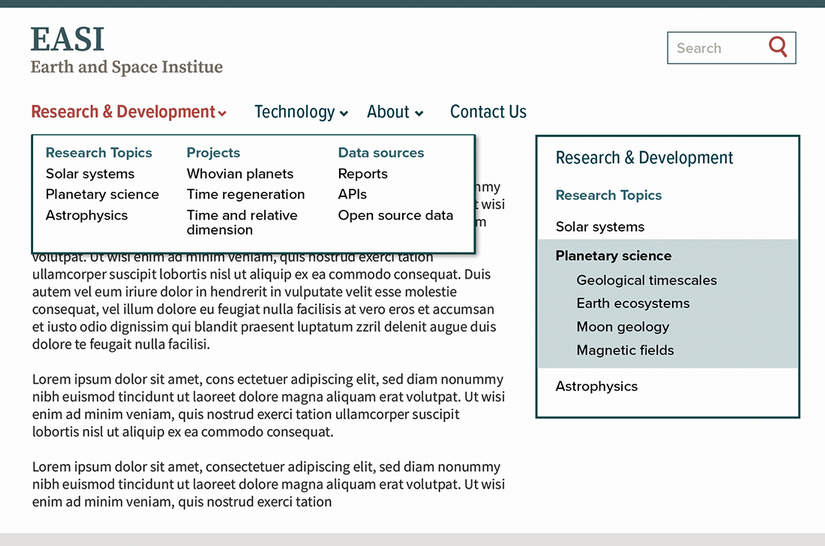
See how a sidebar extends header navigation and helps users understand where they arrived from. section 5.1.1

How Design for Developers covers it

How deep it goes
Explains its role in level-two-and-deeper navigation and wayfinding, without prescribing implementation details.
Examples
Uses a dropdown leading to deeper landing pages and a sidebar exposing navigation beyond header links.
What it assumes
Assumes a site structure with multiple navigation levels and a main menu focused on top-level landing points.
What you can do after
Build it from scratch by providing deeper-section links that help users return upward and locate themselves.
How it connects
Connects secondary navigation with site maps, main navigation menus, breadcrumbs, and wayfinding.

Related concepts

This explainer was generated by Manning's knowledge graph from the text of Design for Developers. The section links point to the parts of the book it draws on.