The Atlas Stream Processing Connection Registry stores connection settings for an individual stream processing instance (SPI). It holds details such as endpoints and authentication credentials so stream processors can communicate with data sources and destinations without putting those details in each pipeline. section 15.4.1
The registry’s scope and reuse rules matter when designing pipelines:
- Only stream processors in the same SPI can use its registered connections. section 15.4.1
- Multiple processors can share a connection. A processor can designate one connection as its source and one as its sink; a connection can serve either role. section 15.4.1
- A $source stage names a registered connection with connectionName when reading from a configured source such as a Kafka broker or MongoDB collection. section 15.5.1
To add and check an Atlas database connection:
- In the Atlas UI, open Stream Processing, select the SPI, then choose Configure → Connection Registry → Add Connection. Select Atlas Database, name the connection, choose a cluster, and set an execution role. section 15.6.5
- Alternatively, create a connection with atlas streams connections create. List an instance’s connections with atlas streams connections list -i <instance-name>, or connect with mongosh and run sp.listConnections(). section 15.6.2 section 15.6.5
Checking what an SPI can use
Running sp.listConnections() on a newly created SPI can show only sample_stream_solar, an in-memory sample connection. After adding an Atlas cluster connection, the listing shows both the new atlas connection and the sample connection. Check the list before referring to a connection by name in $source. section 15.6.2 section 15.6.5
Figure 15.7 Add Connection interface within the Stream Processing panel in Atlas allows you to add connections for stream processors to use for reading and writing events. You have three connection options: Kafka, Atlas Database, and Sample Stream. The form includes fields for entering the connection name and selecting an Atlas cluster. You also have an option to choose the execution role, such as Read and Write to Any Database. At the bottom are buttons that cancel or add the connection. (Image © MongoDB 2025)
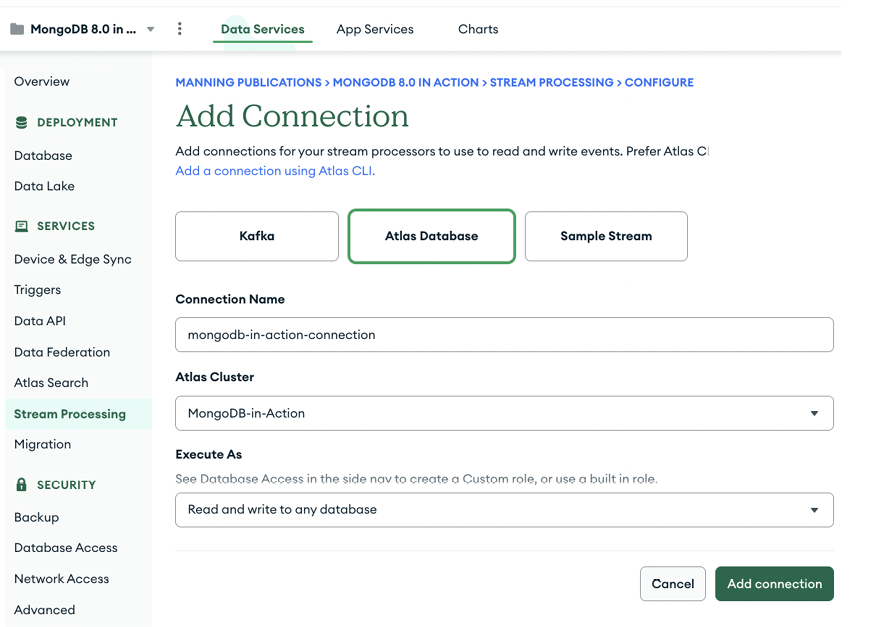
The Add Connection form shows the available connection choices—Kafka, Atlas Database, and Sample Stream—and the fields used to name an Atlas database connection, select its cluster, and choose an execution role. section 15.6.5
Registry administration is project-level work. The Project Stream Processing Owner role can manage SPIs and their connection registries within a project; assign permissions with least privilege in mind. section 15.8.1
