A container registry stores, hosts, and distributes container images. It plays a role similar to a Git repository for code, giving deployment systems a place to download packaged applications. section 5.5 section 5.6
The deployment path builds an image from a Dockerfile, pushes it to a registry, and later lets a container runtime or deployment platform pull and run it. This separates packaging from execution. section 1.2 section 1.4
A practical Docker Hub workflow is:
- Create a Docker Hub account and choose a username. section 5.5
- Log in from the command line with docker login. section 5.5
- Build and tag an image with docker build -t <your-username>/<your-container-name>:<your-tag> -f <your-dockerfile>. section 5.5
- Upload the image with docker push <your-username>/<your-container-name>:<your-tag>. section 5.5
Pulling an NGINX image
Running docker run nginx makes Docker look for the image locally. If it is missing, Docker automatically pulls it from Docker Hub, the default registry, before starting the container. section 5.1.1
Figure 1.2 Code path to Kubernetes
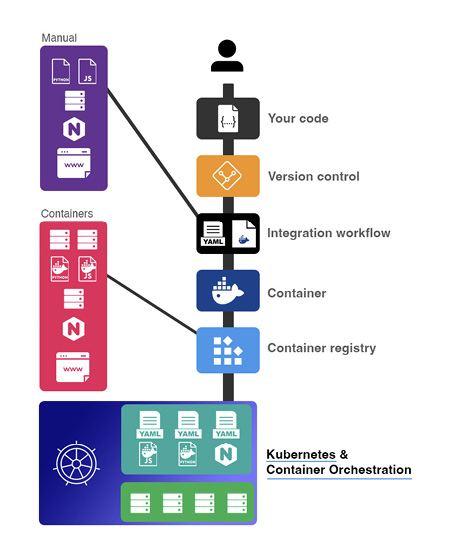
Use the deployment path to connect source changes, container image creation, registry storage, and later Kubernetes deployment. section 1.2







