containers/storage is Podman’s local, on-host storage layer for container images and container writable data. It stores pulled image layers, reassembles them with overlay mounts, and provides the filesystem presented inside a container. section 2.1.1 section 6.2.1
The storage workflow separates image content from container-specific changes:
- Podman checks local storage before pulling an image; existing layers avoid another download. section 2.1.1 section 6.2.1
- The containers/image library retrieves a manifest, configuration, and layers from a registry, while containers/storage assembles those layers locally. section 2.2.4 section 6.2.1
- Storage creates an overlay mount for each layer and untars its contents into the corresponding storage layer. section 6.2.1
- Creating a container adds a writable layer above the read-only image layers; rootful Podman normally uses native overlay mounts. section 6.2.2
- Rootless operation uses native overlay where supported and fuse-overlayfs on older kernels; UID and GID mapping can reject unmapped archive ownership. section 6.2.2 section 6.2.1
Pulling an image into local storage
podman run -ti --rm registry.access.redhat.com/ubi8/httpd-24 bash pulls missing layers into local container storage, mounts them, and starts an interactive container. A later run can skip already-present layers; --rm removes the container’s storage after exit. section 2.1.1
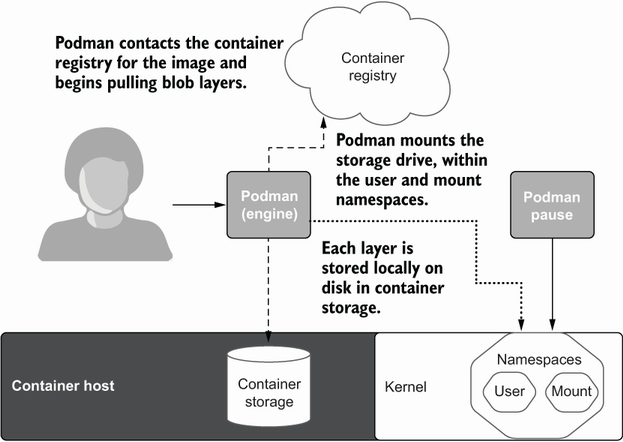
Trace the path from a registry image through downloaded blobs and overlay layers into local container storage. section 6.2.1
