liveBook · Manning

Contextual help

As explained in Architecting Accessibility

Contextual help is assistance presented in relation to the current task or interface context to resolve user uncertainties.

People should be able to resolve uncertainties without leaving a task to search elsewhere. Put help where it is needed, while keeping essential information visible. section 6.7 section 6.6

Match the help to the information people need:

  • Use tooltips for supplementary details. If information is essential, show it as a persistent hint beside the form control and associate it with aria-describedby. section 6.6
  • Offer inline links, expected formats, example inputs, automated suggestions, or instructions near the form. section 6.6
  • For complex or sensitive problems, provide AI-assisted or human support; make it possible to reach a person when needed. section 6.6
Figure 6.15 Tooltip control, showing supplementary information about an input field using an icon button trigger.
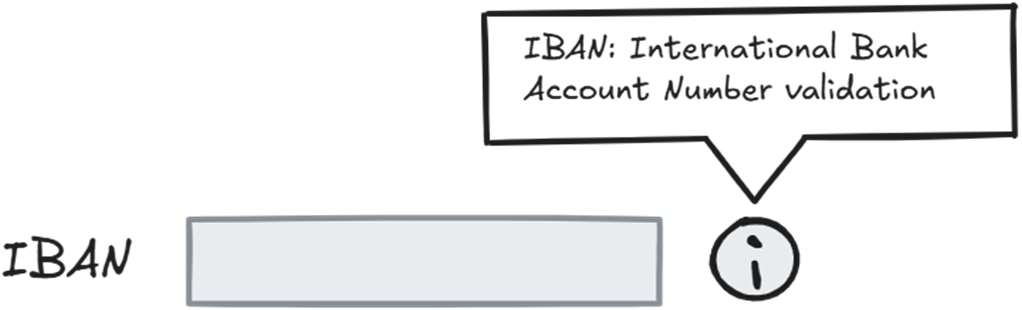
An icon button can trigger a tooltip with supplementary information about an input field. section 6.6

How Architecting Accessibility covers it

How deep it goes
Distinguishes supplementary tooltips from essential persistent hints and outlines links, instructions, input examples, suggestions, and support options.
Examples
Uses an icon-triggered tooltip, adjacent form hints, help links, expected formats, sample inputs, text instructions, and support agents.
What you can do after
Apply contextual help by keeping essential guidance visible beside controls and offering task-local routes to further assistance.
How it connects
Connects contextual help with tooltips, form controls, aria-describedby, inline help, automated suggestions, and live or AI support.

Also explained in

Compare how 2 books explain contextual help →

Related concepts

This explainer was generated by Manning's knowledge graph from the text of Architecting Accessibility. The section links point to the parts of the book it draws on.