Continuous export streams selected Microsoft Defender for Cloud data to another system, helping organizations retain, analyze, and operationalize security information beyond the service’s retention period. section 7.11 section 7.5.1
Configure continuous export by choosing three elements:
- Select recommendations, secure score data, security alerts, or regulatory compliance data. section 7.5.1
- Choose a Log Analytics workspace to retain data inside Azure, or an Event Hub to send it outside Azure, such as to an on-premises SIEM. section 7.5.1
- Enable streaming updates, weekly snapshots, or both. Streaming updates send data when selected values change; snapshots send the current state once per week per subscription. section 7.5.1
Retain alerts and recommendations for 180 days
To retain medium- and high-severity security alerts and recommendations in a Log Analytics workspace, open Microsoft Defender for Cloud in the Azure portal, select Environment Settings, choose the subscription, and open Continuous Export. Select the Log Analytics Workspace tab, enable Security Recommendations and Security Alerts, choose Medium and High, enable Security Findings for nested recommendations, select Streaming Updates and Snapshots, choose the configuration resource group and destination subscription, select the workspace, and save. Alerts appear in the SecurityAlert table and recommendations in the SecurityRecommendation table. Configure the appropriate workspace or Event Hub permissions before saving. section 7.5.2
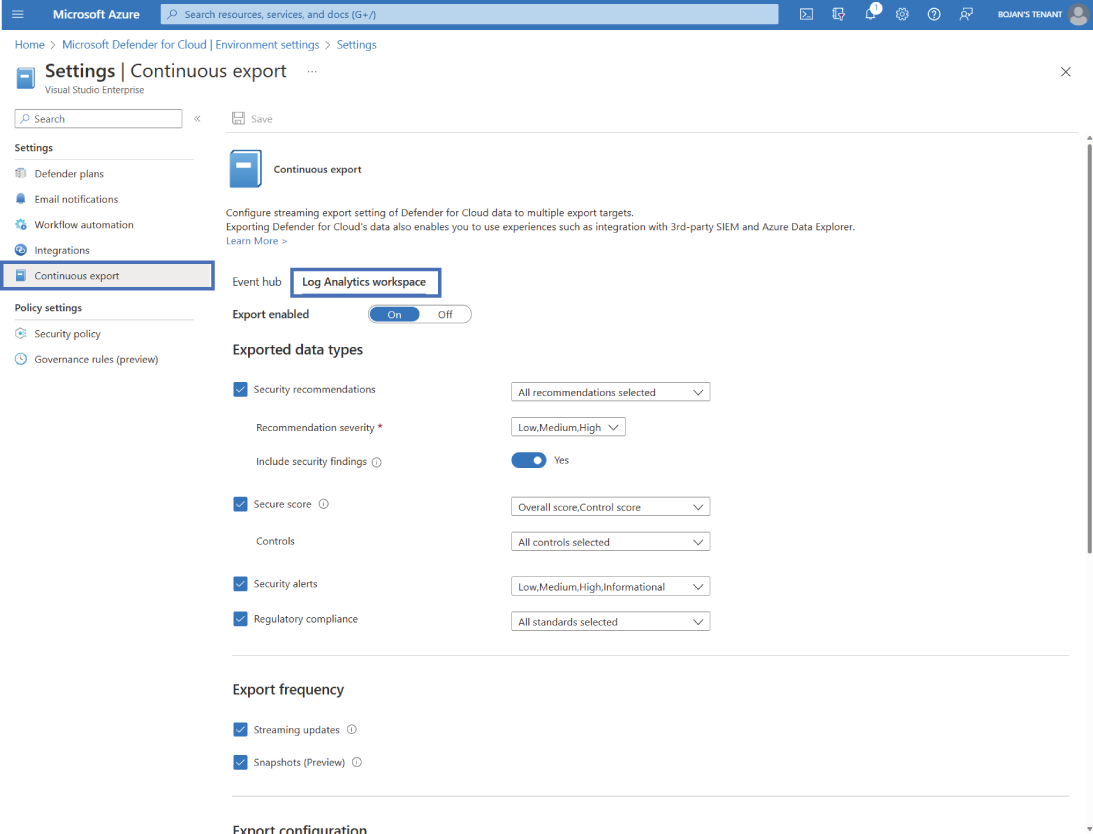
Use the configuration view to locate the subscription, destination workspace, selected data types, severity filters, and export frequencies. section 7.5.2
