An Azure Monitor workbook combines Defender for Cloud data with rich visualizations to make security monitoring practical. Available through the Azure portal and Microsoft Defender for Cloud dashboard, workbooks help teams operationalize security posture, alerts, vulnerabilities, compliance, and coverage. section 7.11 section 7.6
Built-in workbooks address focused security and operational questions:
- Secure Score Over Time tracks security posture and recommended resource changes. section 7.6.1
- Compliance Over Time follows alignment with selected regulatory standards. section 7.6.1
- Vulnerability Assessment Findings and Active Alerts summarize resource vulnerabilities and security alerts. section 7.6.1
- System Updates, Governance, Coverage, Ransomware Dashboard, Cost Estimation, and Containers Security target updates, rules, plan gaps, ransomware risk, pricing, and container security. section 7.6.1
Estimate Defender for Cloud plan costs
With at least Reader access on the relevant subscriptions, open the Microsoft Defender for Cloud dashboard in the Azure portal, select Workbooks, and open Cost Estimation. Choose subscriptions and Defender for Cloud plans, then optionally enable Additional Information. The workbook shows monthly estimates per subscription based on list prices; invoice totals may differ. section 7.6.2
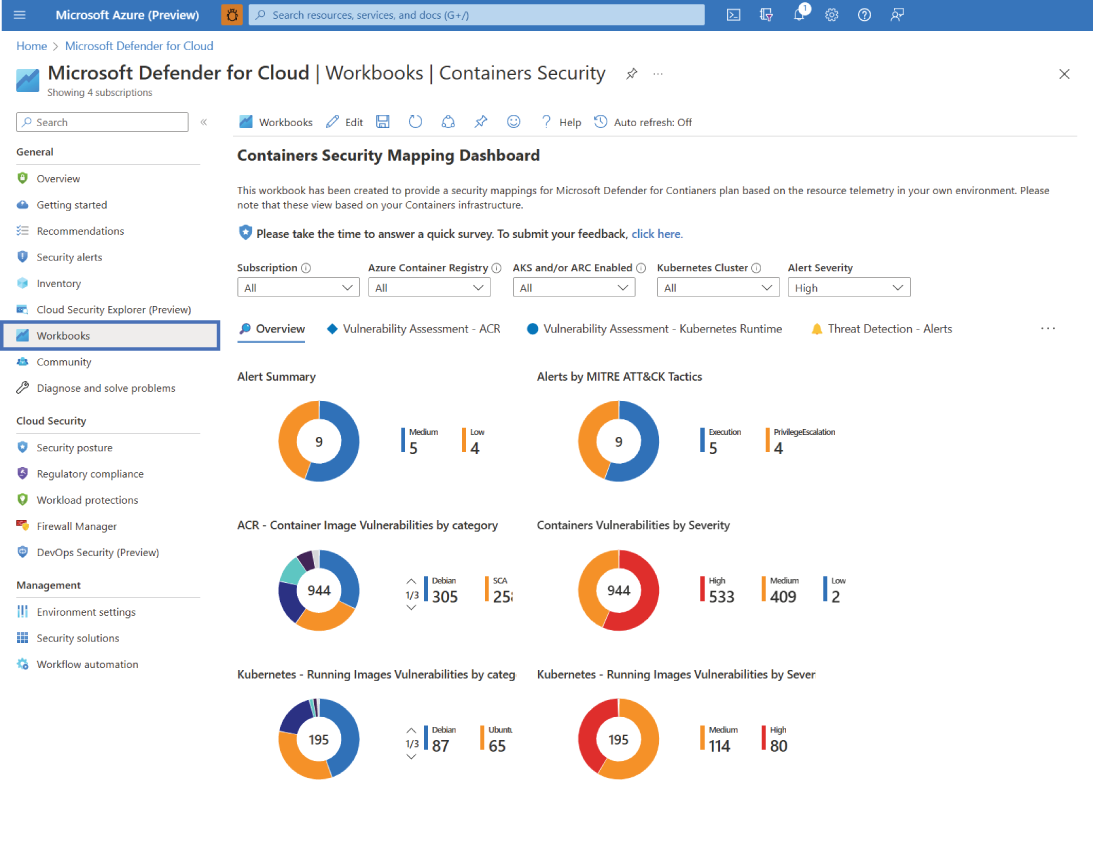
A containers security workbook brings together vulnerability scans, recommendations, security alerts, and MITRE ATT&CK tactics in one dashboard view. section 7.6.1
