Content hub is a Microsoft Sentinel feature for deploying the security content needed to address a threat scenario. Instead of ingesting data alone, it bundles data connectors with supporting detection, investigation, and response capabilities. section 8.13 section 8.3.4
Use Content hub when a security scenario requires more than raw data ingestion:
- Deploy relevant data connectors to bring source data into Sentinel. section 8.3.3
- Add analytics rules to detect threats in the collected data. section 8.13 section 8.3.4
- Include workbooks and automations that support investigation and response. section 8.3.3 section 8.3.4
- Prefer the Microsoft 365 Defender connector when collecting data across multiple Microsoft Defender SaaS security solutions. section 8.3.3
Responding to a zero-day vulnerability
Select the Content hub package for the vulnerability, deploy its data connectors, analytics, workbooks, and automations in a single step, then use the resulting Sentinel data and rules to detect exposure and guide response. Content hub is in public preview, so data connectors remain an available alternative until general availability. section 8.3.4
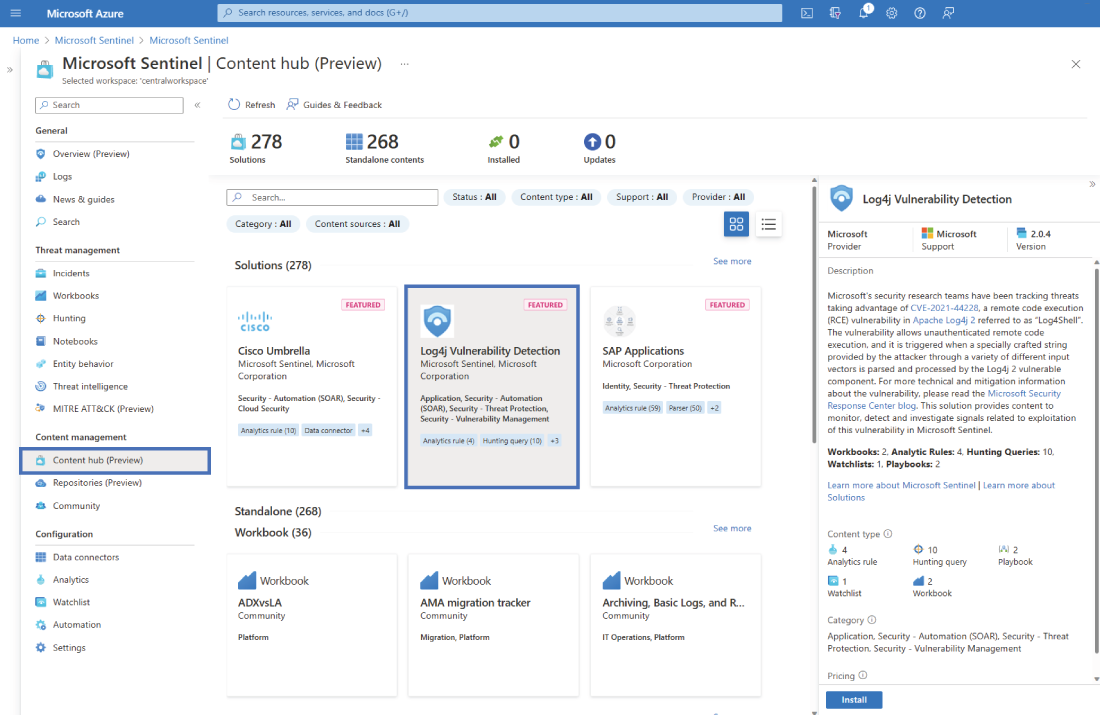
Use the Sentinel dashboard overview to locate Content hub and review its packaged security content. section 8.3.4
