Microsoft Sentinel is a cloud-native SIEM service in Azure for collecting security events and contextual data across cloud, on-premises, and public-cloud environments. It combines scalable data collection, analytics and threat intelligence to detect attacks that could otherwise go unnoticed. section 8.0 section 8.2
Its operating loop is collect, detect, investigate, and respond. Collected data is stored in Log Analytics workspaces, analytics rules identify threats or signs of compromise, and the Incidents dashboard supports investigation of blast radius and potential root cause. section 8.2.1 section 8.13
Build useful detection coverage deliberately:
- Start with security use cases, then ingest only data that has investigation value; indiscriminate collection creates inefficiency and unnecessary charges. section 8.3.1
- Collect through data connectors, REST API integrations, or agent-based streaming for on-premises sources. Typical inputs include security alerts, network and endpoint logs, identity data, SaaS data, threat intelligence, and custom logs. section 8.3.1
- Prefer Content hub when available: it can provide data connectors together with analytics rules and playbooks in one action. Use built-in templates or scheduled query rules, and simulate rule results against your data before relying on them. section 8.13
- Use automation rules to centrally manage remediation activities and run playbooks. Playbooks integrate with Azure Logic Apps for workflows tailored to organizational requirements. section 8.13
Automated alert notification
Create an automation rule that runs when an incident is created from a Microsoft Defender for Cloud analytic rule, then run the Incident Email Notification playbook to send an email. This turns a detected cloud-security alert into a repeatable response action. section 8.12
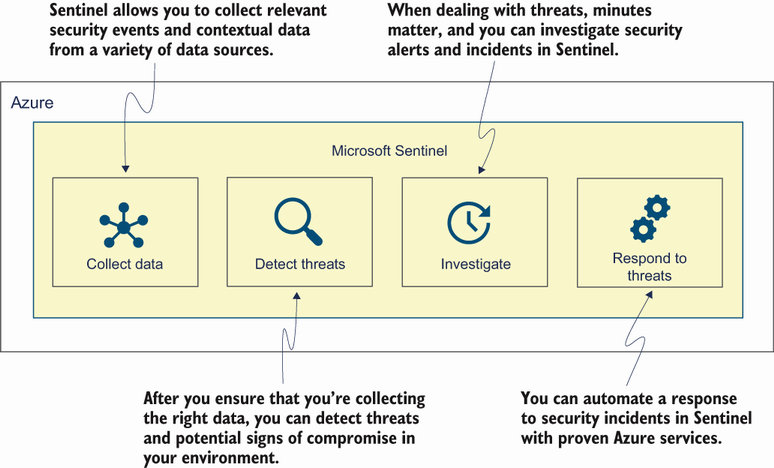
View the service as a four-part security-operations flow: collect data, detect threats, investigate incidents, and automate response and remediation. section 8.2.1
