A security alert is a high-confidence notification that suspicious activity may represent a threat or compromise. Microsoft Defender for Cloud continuously monitors Azure environments, correlates signals from multiple sources, and uses techniques such as behavioral analytics and anomaly detection before triggering an alert for triage and investigation. Alerts can cover Windows and Linux resources across compute, containers, data, networking, and service layers. section 7.3
An alert is evidence to investigate, not proof that every detected event is malicious. Penetration testing can trigger alerts because its activity resembles probing or compromise attempts. Suppression rules can automatically dismiss known false positives or overly frequent alerts, but require caution and ongoing review to avoid alert fatigue without hiding meaningful risk. section 7.3
Prioritize alerts with the dashboard context available for each finding:
- Severity: High indicates likely compromise and demands highest priority; Medium signals possible compromise; Low can indicate a benign positive or blocked attack; Informational alerts may matter in the context of an incident. section 7.3.1
- MITRE ATT&CK mapping: applicable tactics and techniques help identify likely attacker intent and order investigations. section 7.3.1
- Incident grouping: several related alerts can be collected into a security incident for combined handling. section 7.3
Investigate an alert by opening it from Security Alerts, filtering by resource, MITRE ATT&CK tactic, or time range when needed, and changing its status to In Progress. Full details expose the detected activity, status, time, client IP address, location, and related entities. Use Take Action to review mitigation steps and prevention recommendations, then resolve the alert after the investigation is complete. section 7.3.2
Responding to a suspected brute-force attack
A suspected successful brute-force alert can be investigated for its source IP address and related entities. A workflow automation can then match Security Alert data for Failed SSH Brute-Force Attack and invoke a selected Logic App to block originating IP addresses. This configuration requires appropriate resource-group and Logic App permissions. section 7.3.2 section 7.4.1
Alerts also support a layered container-security posture. Defender for Cloud can identify cluster misconfigurations, recommend fixes, and detect suspicious cluster activity; confirmed attacks generate alerts that can be forwarded to Microsoft Sentinel for broader investigation and response. Continuous monitoring remains important because vulnerabilities can emerge after containers are running, while patching a running container does not update its registry image. section 4.4.3
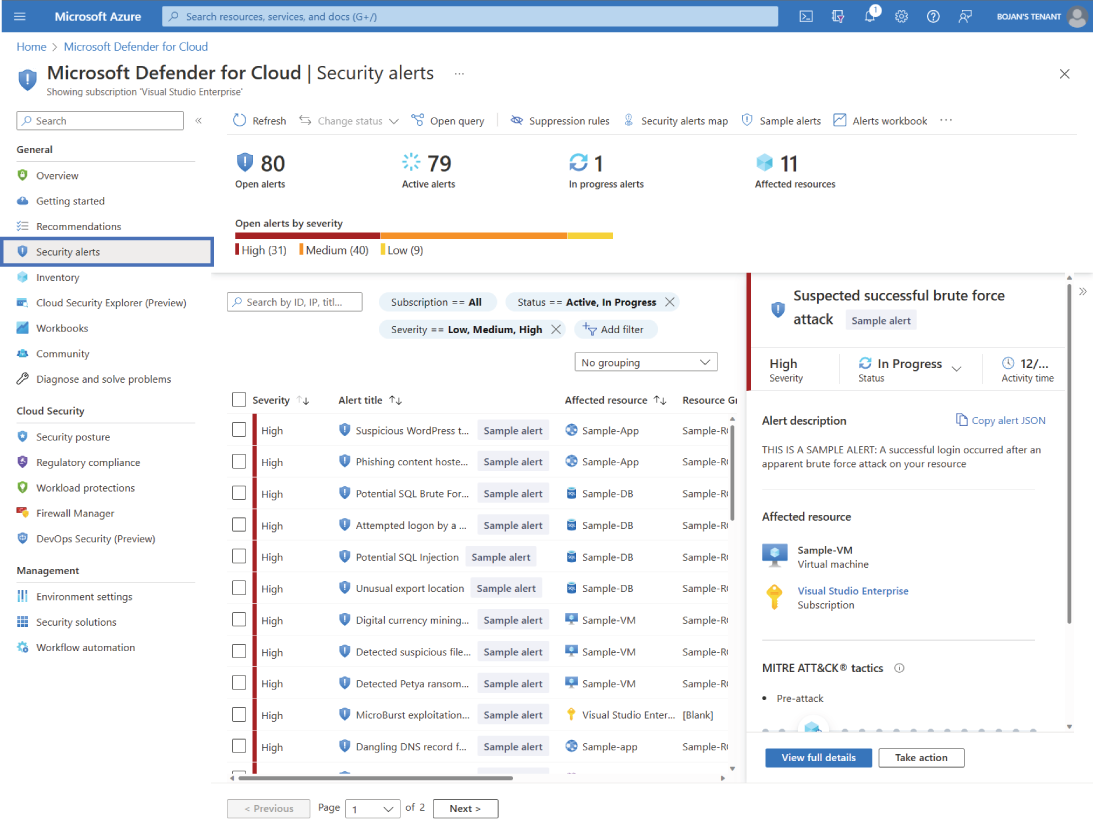
Use the Security Alerts dashboard to review triggered alerts and choose which one to investigate first; default ordering follows alert severity. section 7.3.1
